Skip to content
SEOHost.NET

SEOHost.NET

Most Diverse IP provider

  • Seo Hosting USA
  • A Class IP USA
  • Seo VPS USA
  • Dedicated Seo Server USA
  • Seo Hosting EU
  • A Class IP EU
  • Seo VPS EU
  • Seo Dedicated Server EU

Category: SEO

  • How Much Does SEO Hosting Cost? A Transparent Pricing Breakdown

    How Much Does SEO Hosting Cost? A Transparent Pricing Breakdown

    • What You Are Actually Buying When You Pay an SEO Hosting Cost
      • The Scarcity That Sets the Floor
      • What Rides Along With Each Address
    • The Complete SEO Hosting Cost Grid, Published in Full
      • The Price Inversion Nobody Advertises
    • The 32-IP Rule: Where Your SEO Hosting Cost Flips
    • Worked SEO Hosting Cost at 10, 50, and 800 Sites
    • Geography as a Line Item: Why EU IPs Cost More
    • When the Server, Not the Address, Becomes the Cost
    • The Honest Part: What Your SEO Hosting Cost Does Not Buy
    • Calculate Your Own SEO Hosting Cost
    • A Practical Checklist Before You Pay Anything
    • Frequently Asked Questions: SEO Hosting Cost
      • How much does SEO hosting cost per month for a small business?
      • What is the difference between SEO hosting cost and SEO agency cost?
      • Why does the per-IP price fall when I move to an SEO VPS in 2026?
      • At what number of IPs does an SEO VPS become cheaper than shared SEO hosting?
      • How much does SEO hosting cost at SEOHost.net for a 50-site private blog network?
      • Is SEOHost.net cheaper than buying IPv4 addresses outright in 2026?
      • Does paying more for SEO hosting actually improve Google rankings?
      • Why do EU Class C IPs cost more than USA Class C IPs at SEOHost.net?
      • When is a dedicated server worth $299 versus an SEO VPS in 2026?
      • What hidden costs should I budget beyond the advertised seo hosting cost?
    TL;DR

    The seo hosting cost is $4.25 per IP monthly, so 10 sites run $42.50. Per-IP price falls with platform, not volume: past 32 IPs an SEO VPS is permanently cheaper than shared.

    Search for SEO hosting cost and you will be told the answer is somewhere between $1,500 and $5,000 a month. That number is real, and it is also completely wrong, because it describes something else entirely. Every result on that page prices SEO services — the agency retainer, the consultant, the content team. In fact, a poll of 439 SEO providers put the average retainer at $2,917 per month. Meanwhile, SEO hosting — the infrastructure that puts each of your sites on its own dedicated Class C IP address — starts at $4.25. Not per site per hour. Per IP, per month.

    Listen: what SEO hosting actually costs, and the 32-IP threshold most buyers cross without noticing. By Terry Cane, Chief Operating Officer, SEOHost.net.

    Consequently, this guide does the thing the pricing pages will not: it publishes the whole grid, runs the arithmetic at 10, 50, and 800 addresses, and shows you the exact point where the tier you are on stops being the cheap one. Furthermore, it names the number where that flip happens, because almost nobody notices when they cross it.

    What You Are Actually Buying When You Pay an SEO Hosting Cost

    Fundamentally, you are renting scarce addresses, not renting disk space. Specifically, an SEO hosting plan bills you per IP address because the IP address is the scarce thing; the storage attached to it is almost an afterthought. Therefore, understanding the price means understanding why a string of four numbers costs more than the server it points at.

    The Scarcity That Sets the Floor

    Notably, IPv4 addresses ran out. The registries that hand them out have exhausted their free pools, and RIPE NCC — the registry covering Europe — describes the result plainly as an acute shortage of unused IPv4 addresses affecting network operators worldwide. In practice, a new member can now request at most a single small allocation from whatever addresses get recovered, and the queue for that is long.

    As a result, addresses now trade on a secondary market. Historically, IPv4 addresses have sold in the range of roughly $11 to $32 each, having peaked considerably higher during the 2021 squeeze. Accordingly, when a host quotes you $4.25 a month for a dedicated Class C IP, that price is anchored to a genuinely scarce asset — which is why nobody in this market is giving addresses away, and why “unlimited IPs” is not a thing that exists.

    What Rides Along With Each Address

    Specifically, every IP on a USA Class C IP hosting plan arrives with 5 GB of storage and 50 GB of bandwidth attached. Furthermore, the account includes cPanel and WHM, the IP Manager plug-in for reassigning addresses to domains, private nameservers for each domain, free migration from any cPanel host, and daily and weekly backups. Consequently, the per-IP figure is not a base price waiting for add-ons — it is close to the whole bill.

    However, that 5 GB and 50 GB ceiling is a real constraint worth reading twice. In practice, it is generous for the small content sites these networks are usually built from, and tight for anything media-heavy. Therefore, if your sites are image or video heavy, the address is not your binding constraint and you should be reading the VPS section below rather than this one.

    The Complete SEO Hosting Cost Grid, Published in Full

    Notably, here is every per-IP tier SEOHost.net charges, in one table, with nothing withheld. Specifically, the reason this table is worth its own heading is that reading it top to bottom reveals something that contradicts how almost everyone shops for SEO hosting.

    PlatformIP quantity bandPrice per IP / monthPlatform fee
    Class A IP hosting (USA)5–12 addresses$8.50None
    Shared SEO hosting (EU)5–249 addresses$4.75None
    Shared SEO hosting (EU)250–500 addresses$4.25None
    Shared SEO hosting (USA)5–399 addresses$4.25None
    Shared SEO hosting (USA)400–800 addresses$3.75None
    Dedicated server (USA)5–399 addresses$4.25From $299/mo
    Dedicated server (USA)400–800 addresses$3.75From $299/mo
    SEO VPS (USA)5–799 addresses$3.00From $40/mo
    SEO VPS (USA)800–1,600 addresses$2.50From $40/mo

    The Price Inversion Nobody Advertises

    Specifically, the per-IP price does not fall as you buy more addresses. It falls as you change platform. Notably, the cheapest address in the entire grid — $2.50 — sits on the SEO VPS tier that most buyers assume is the expensive upgrade, and the VPS also carries the highest ceiling at 1,600 addresses. Meanwhile, the dedicated server, which costs $299 before a single IP is added, charges more per address than the VPS does.

    Consequently, the intuition that drives most purchasing decisions — buy more, pay less each — is only half true here. In practice, volume discounts within a tier are modest, moving you 50 cents at best. By contrast, changing tier moves you $1.25 to $1.75 per address, every month, on every address you own. Therefore, the platform choice is worth several times more than the volume negotiation, and it is the decision almost nobody deliberately makes.

    The 32-IP Rule: Where Your SEO Hosting Cost Flips

    Specifically, at 32 IP addresses, shared SEO hosting and an entry SEO VPS cost exactly the same: $136.00 per month. Furthermore, from 33 addresses upward the VPS is cheaper, and it never stops being cheaper. Accordingly, we call this the 32-IP Rule, and it is the single most useful number in this article.

    The arithmetic is not complicated. Shared hosting charges $4.25 per address with no platform fee. An entry SEO VPS charges $40 for the machine plus $3.00 per address. Therefore the VPS starts $40 behind and claws back $1.25 on every address, so it needs 32 addresses to draw level.

    Dedicated IPsShared SEO hostingEntry SEO VPSCheaper tier
    10$42.50$70.00Shared (by $27.50)
    20$85.00$100.00Shared (by $15.00)
    30$127.50$130.00Shared (by $2.50)
    32$136.00$136.00Identical — the flip point
    33$140.25$139.00VPS (by $1.25)
    50$212.50$190.00VPS (by $22.50)
    100$425.00$340.00VPS (by $85.00)
    400$1,500.00$1,240.00VPS (by $260.00)
    800$3,000.00$2,040.00VPS (by $960.00)

    Notably, look at the bottom row. At 800 addresses the gap is $960 every month — $11,520 a year — for identical address diversity from the identical pool. Consequently, an operator who scaled a shared plan from 10 sites to 800 sites without ever revisiting the tier decision has been overpaying by roughly the cost of a small car, annually, for a decision they made once and never questioned.

    Worked SEO Hosting Cost at 10, 50, and 800 Sites

    In practice, the number you actually care about is cost per site. Specifically, assuming the standard one-site-per-IP configuration that makes SEO hosting worth buying at all, here is what each network size costs and what each site inside it costs.

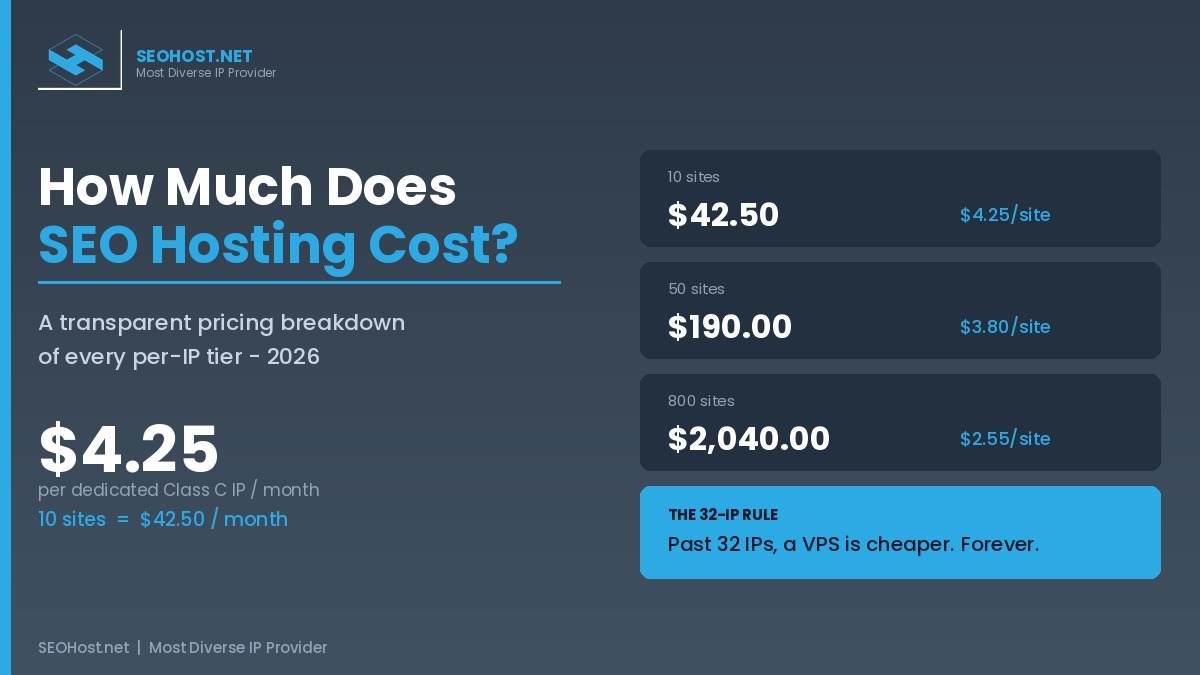
    Network sizeCheapest tierMonthly totalCost per siteAnnual total
    10 sitesShared SEO hosting$42.50$4.25$510.00
    50 sitesEntry SEO VPS$190.00$3.80$2,280.00
    800 sitesSEO VPS$2,040.00$2.55$24,480.00

    Interestingly, cost per site falls from $4.25 to $2.55 as the network grows — a 40 percent improvement — but almost none of that saving comes from the volume discount. Specifically, it comes from switching platform at the right moment. Therefore, an operator who stays on shared all the way to 800 sites pays $3.75 per site instead of $2.55, and pockets none of the improvement they think scale is earning them.

    Furthermore, note what happens at the 10-site end. Ten sites for $42.50 a month is less than a single hour of the average SEO consultant’s time. Consequently, for a small operator, the infrastructure is genuinely not the expensive part of SEO — which is worth remembering when a search engine tells you SEO costs $3,000 a month.

    Geography as a Line Item: Why EU IPs Cost More

    Specifically, European Class C addresses start at $4.75 against $4.25 for USA addresses — a 50-cent monthly premium per IP. In practice, that premium is regional scarcity showing up on your invoice rather than a marketing upcharge, because European address space is administered under RIPE NCC’s exhausted pool and its recovery-only waiting list.

    Consequently, buy European Class C IPs across Sweden, the UK, Germany and beyond when you are genuinely targeting European SERPs, and do not buy them for the sake of diversity alone. Notably, the EU pool covers 20 countries and 600 Class C addresses, so it is deep enough for real geo-targeting — but at 100 addresses the premium costs you $600 a year, which is only worth paying if the geography is doing work.

    When the Server, Not the Address, Becomes the Cost

    Notably, there is one case where the price grid stops being the right way to decide. Specifically, once your constraint is CPU, RAM, or bandwidth rather than address count, you are no longer buying IPs — you are buying a machine, and the addresses ride along.

    Accordingly, the bare-metal tier with 12 cores and 5 TB of bandwidth starts at $299 a month and charges $4.25 per address — more per IP than the VPS. Therefore, buying dedicated to get cheaper addresses is exactly backwards. Instead, three signals justify it: sustained concurrent load across the full domain set, workloads such as scraping or rank-tracking that need real hardware behind them, and root-level requirements a virtualized slice cannot satisfy. If none of those is true, the VPS is cheaper on every axis that matters.

    The Honest Part: What Your SEO Hosting Cost Does Not Buy

    Honestly, paying more does not rank you higher, and it never has. Specifically, Google treats a change of host or IP address as a routine infrastructure move rather than a ranking event, and there is no tier of hosting that functions as a ranking multiplier. Therefore, any provider implying that a pricier plan lifts positions is selling a story.

    Instead, what the money buys is separation and control: each site on its own Class C address, so that a network of interlinked properties does not present a single shared-server fingerprint to a crawler. Furthermore, that is a protective purchase, not a promotional one — a point our guide to which hosting model you actually need works through in detail, and one worth internalizing before you spend anything at all.

    Consequently, the correct strategy is the cheapest tier that delivers the separation you need — which is precisely why the 32-IP Rule matters more than any feature comparison. Additionally, because the same infrastructure independence governs whether AI answer engines can reach and cite your properties, the way diverse IP networks build AI authority is the other half of the same argument. Ultimately, if you are still unsure what the product category even covers, our older explainer on what SEO hosting actually is remains the right starting point.

    SEO Hosting Cost: Per-IP Price by Platform and the 32-IP Rule Chart comparing SEOHost.net per-IP pricing across Class A, EU shared, USA shared, dedicated server and SEO VPS tiers, and showing that an SEO VPS becomes cheaper than shared hosting above 32 IP addresses. SEOHOST.NET MOST DIVERSE IP PROVIDER SEO Hosting Cost, 2026 Per-IP price falls with PLATFORM – not with volume PRICE PER DEDICATED CLASS C IP / MONTH Class A $8.50 Shared EU $4.75 Shared USA $4.25 Dedicated $4.25 SEO VPS $2.50 cheapest + highest ceiling THE 32-IP RULE 32 IPs = $136.00 Shared and SEO VPS cost exactly the same. From 33 IPs, the VPS is cheaper forever. At 800 IPs the VPS saves $960 / month -> $11,520 / year COST PER SITE, ONE SITE PER IP 10 SITES $42.50/mo $4.25/site 50 SITES $190.00/mo $3.80/site 800 SITES $2,040.00/mo $2.55/site seohost.net | Verified from live pricing, July 2026

    Calculate Your Own SEO Hosting Cost

    Specifically, the calculator below prices your exact address count against every tier at once and names the cheapest. Furthermore, it flags whether you have crossed the 32-IP Rule, which is the answer most people come here for without knowing it.

    SEO Hosting Cost Calculator

    Drag to your dedicated Class C IP count. Every tier is priced from the live July 2026 grid.

    10 dedicated Class C IPs
    Shared SEO Hosting (USA)$4.25 per IP
    $42.50
    SEO VPS (USA)$40 platform + $3.00 per IP
    $70.00
    Dedicated Server (USA)$299 platform + $4.25 per IP
    $341.50
    See the live pricing

    A Practical Checklist Before You Pay Anything

    Ultimately, five questions decide your seo hosting cost, and they take about two minutes to answer honestly.

    • Count the addresses you will need in twelve months, not today. Because the 32-IP Rule is a threshold, buying for today’s count can put you on the wrong side of it within a quarter.
    • Check whether you have already crossed 32 IPs. If you are on shared hosting above 33 addresses, you are overpaying every single month, and the overpayment grows with every site you add.
    • Test your storage against the 5 GB and 50 GB per-IP ceiling. Media-heavy sites break this constraint long before the address count matters.
    • Buy EU addresses only if you are targeting EU SERPs. Otherwise the 50-cent premium per IP is diversity you are paying for and not using.
    • Escalate to dedicated only when resources, not addresses, are the constraint. Because the dedicated tier charges more per IP than the VPS, buying it for cheap addresses is a strictly worse deal.

    Finally, remember what the number actually is. Ten sites on fully dedicated Class C addresses cost $42.50 a month — less than one hour of an average SEO consultant’s time. Therefore, whatever is expensive about SEO in 2026, the infrastructure almost certainly is not it.

    Frequently Asked Questions: SEO Hosting Cost

    How much does SEO hosting cost per month for a small business?

    Specifically, a small business running 10 sites on dedicated Class C IPs pays $42.50 per month at SEOHost.net, because shared SEO hosting is billed at $4.25 per IP and each IP includes 5 GB of space and 50 GB of bandwidth. Notably, that is roughly one percent of what the same business would pay an SEO agency. The seo hosting cost tables further down break the figure out at 10, 50, and 800 IPs.

    What is the difference between SEO hosting cost and SEO agency cost?

    In practice, they are unrelated purchases that share a search term. Specifically, SEO hosting is infrastructure billed per IP address, starting at $4.25 per month, while SEO services are human labor billed as a retainer averaging $2,917 monthly. Consequently, a searcher comparing the two is comparing a server line item against a payroll line item.

    Why does the per-IP price fall when I move to an SEO VPS in 2026?

    Fundamentally, the per-IP price tracks the platform, not the quantity. Specifically, shared SEO hosting charges $4.25 per IP while an SEO VPS charges $3.00 and drops to $2.50 above 800 addresses, because a VPS assigns addresses to one tenant’s routing rather than administering them across a shared pool. Therefore, the cheapest per-IP rate sits on the tier most buyers assume is more expensive.

    At what number of IPs does an SEO VPS become cheaper than shared SEO hosting?

    Specifically, at 32 IPs. At exactly 32 addresses both tiers cost $136.00 per month, and from 33 IPs upward the SEO VPS is permanently cheaper. Furthermore, that crossover is what we call the 32-IP Rule, and the full break-even table appears in the pricing section above the calculator.

    How much does SEO hosting cost at SEOHost.net for a 50-site private blog network?

    Specifically, 50 dedicated Class C IPs cost $212.50 monthly on shared SEO hosting or $190.00 on an entry SEO VPS, which works out to $3.80 per site. Notably, 50 IPs sits past the 32-IP break-even, so the VPS is already the cheaper tier at this size. However, the interactive calculator below prices your exact address count.

    Is SEOHost.net cheaper than buying IPv4 addresses outright in 2026?

    Typically, yes, by a wide margin for anything under a few hundred addresses. Specifically, IPv4 addresses have traded at roughly $11 to $32 each on the transfer market, and the smallest routable block is a /24 of 256 addresses, so ownership means a five-figure purchase plus routing infrastructure. Accordingly, renting 10 IPs at $42.50 monthly is the rational choice until scale changes the arithmetic.

    Does paying more for SEO hosting actually improve Google rankings?

    Honestly, no, and any host promising otherwise is selling you something. Specifically, Google treats a hosting or IP change as a routine infrastructure move rather than a ranking event. Therefore, seo hosting cost buys footprint separation and operational control, not a ranking multiplier, which is precisely why the cheapest tier that meets your needs is the correct tier.

    Why do EU Class C IPs cost more than USA Class C IPs at SEOHost.net?

    Specifically, EU addresses start at $4.75 per IP against $4.25 in the USA, a 50-cent premium driven by regional scarcity. Notably, European address space is administered by RIPE NCC, whose free pool ran out and now issues at most a single small allocation from recovered space. Consequently, geography is a real line item in your seo hosting cost, not a marketing upcharge.

    When is a dedicated server worth $299 versus an SEO VPS in 2026?

    In practice, only when server resources rather than address count drive the decision. Specifically, the SEOHost.net dedicated tier starts at $299 monthly for 12 cores, 16 GB of RAM, and 5 TB of bandwidth, and its IPs cost $4.25 each, which is more than the VPS rate. Therefore, buying dedicated purely to get cheaper addresses is backwards, and the checklist below names the three signals that justify it.

    What hidden costs should I budget beyond the advertised seo hosting cost?

    Notably, three line items catch buyers out: the storage and bandwidth ceiling of 5 GB and 50 GB per IP, the platform fee on VPS and dedicated tiers that shared hosting does not carry, and the address count you actually need rather than the count you have today. Furthermore, SEOHost.net includes cPanel and WHM, IP Manager, private nameservers, and migration at no extra charge, which are commonly billed separately elsewhere.

    July 14, 2026
  • SEO Hosting vs PBN Hosting: Which Do You Actually Need?

    SEO Hosting vs PBN Hosting: Which Do You Actually Need?

    • What "SEO Hosting" and "PBN Hosting" Actually Mean (And Why People Confuse Them)
      • The Footprint Problem Both Models Try to Solve
    • The Two Models Behind the Labels
      • Model One: The Distributed-Cloud PBN Network
      • Model Two: The Dedicated Class C cPanel Server
    • The Control Tradeoff: The Real Decision You're Making
    • SEO Hosting vs PBN Hosting: The Model Matrix
    • When Distributed-Cloud PBN Hosting Is the Right Call
    • When Dedicated Class C + cPanel Is the Right Call
    • Which Model Do You Actually Need?
    • A Practical Checklist: Matching the Model to Your Project
    • Frequently Asked Questions: SEO Hosting vs PBN Hosting
      • What is the difference between SEO hosting vs PBN hosting?
      • Is SEO hosting vs PBN hosting a meaningful distinction in 2026?
      • Which is better for a private blog network, SEO hosting or PBN hosting?
      • Does SEOHost.net offer dedicated Class C IPs with a real control panel?
      • In SEO hosting vs PBN hosting, when should I choose the distributed-cloud model?
      • When does SEOHost.net's dedicated Class C cPanel hosting beat a managed PBN cloud in 2026?
      • What is the Control Tradeoff in SEO hosting vs PBN hosting?
      • How does SEOHost.net's IP model differ from distributed-cloud PBN hosting?
      • Can PBN hosting handle non-WordPress sites and scraping servers in 2026?
      • Does SEO hosting vs PBN hosting affect getting cited by AI search engines?
    TL;DR

    The choice in SEO hosting vs PBN hosting is really a choice about control: dedicated Class C IPs on cPanel/WHM give you owned, transparent infrastructure, while distributed-cloud PBN hosting trades that control for hands-off convenience.

    If you have shopped for hosting to run a network of sites, you have hit the same wall everyone does: the term SEO hosting vs PBN hosting seems to describe two different products, yet the sales pages blur together. Furthermore, each vendor insists its own approach is the only serious option. The confusion is not accidental. Most providers sell exactly one model, so they frame that model as the answer rather than as a tradeoff. This guide separates the labels from the underlying architecture and gives you an honest, side-by-side way to decide.

    Listen: the two hosting models and how to choose between them. By Terry Cane, Chief Operating Officer, SEOHost.net.

    Specifically, there are two real engineering models hiding behind the marketing, and the SEO hosting vs PBN hosting debate is almost always a debate between them. Once you can see the two models clearly, the decision stops being about which vendor shouts loudest and starts being about what your project actually needs.

    What “SEO Hosting” and “PBN Hosting” Actually Mean (And Why People Confuse Them)

    In short, both terms describe hosting designed to make a portfolio of related sites look independent to search engines. The difference is in the wording, not the goal. “SEO hosting” is the older, broader term for hosting that assigns each site its own dedicated IP address, historically to diversify the network footprint. “PBN hosting” is the newer, narrower term that grew up around private blog networks, where the priority is hiding any connection between the sites entirely.

    Notably, the reason people confuse the two is that the marketing has collapsed the distinction. A provider selling dedicated Class C IPs will call it SEO hosting; a provider selling a managed, hands-off network will call the same underlying idea PBN hosting. Even Easy Blog Networks states out right that the terms SEO hosting and PBN hosting are used interchangeably, while arguing its own approach is better understood as PBN hosting. As a result, buyers assume they are comparing two categories when they are really comparing two delivery models for one goal. To learn how the older label was originally defined, our explainer on what exactly SEO hosting is lays out the Class C IP foundation in detail.

    The Footprint Problem Both Models Try to Solve

    Fundamentally, both models exist to solve the “footprint” problem. When many related sites share one IP address, one set of nameservers, and one registrar, a search engine can trivially connect them. That shared fingerprint is what devalues an interlinked network. It is worth being honest here about what Google says: its Search Advocate John Mueller has stated plainly that there is no SEO advantage to a dedicated IP and that shared hosting is fine for ordinary sites. The footprint concern is specific to interlinked networks built for link equity, not to standalone websites. Consequently, the entire point of specialized hosting, whether you call it SEO hosting or PBN hosting, is to break that network fingerprint into pieces that look unrelated. The two models simply break it differently, which is exactly where the real decision lives.

    The Two Models Behind the Labels

    Practically, once you strip away the branding, every provider in this niche is selling one of two architectures. Understanding both is the whole game, because the SEO hosting vs PBN hosting question is answered the moment you know which architecture your project needs.

    Model One: The Distributed-Cloud PBN Network

    Typically, the distributed-cloud model spreads your sites across a large pool of third-party infrastructure that the provider manages for you. A well-known example, Easy Blog Networks, publishes the exact providers it uses: roughly 21 upstream hosting providers and 4 separate DNS providers, reaching up to 500 IP addresses spread over 100-plus data centers. Moreover, the platform rotates and manages those IPs automatically, so you never assign or even see the individual addresses. The pitch is convenience: you add a site, the system places it somewhere in the cloud, and the network looks diverse without any work from you.

    However, that convenience has a hard boundary. Because the infrastructure is abstracted away, you get no control panel, no root access, and typically WordPress-only support. In other words, you are renting placement in someone else’s managed cloud, and the abstraction that makes it easy is the same abstraction that limits what you can do.

    Model Two: The Dedicated Class C cPanel Server

    By contrast, the dedicated Class C model gives you a real server with real, owned IP addresses that you administer through cPanel and WHM. Each site can receive its own dedicated Class C IP, and you assign private nameservers per domain so no shared fingerprint ties the network together. Instead of hiding the infrastructure, this model hands it to you. As a result, you can host non-WordPress applications, run a scraping or rank-tracking server, and see exactly which IP every site uses.

    This is the model SEOHost.net is built around, and it is worth being precise about what it includes. Its dedicated Class C IP hosting on cPanel/WHM ships with a custom WHM plugin that lets you change or assign a domain’s IP directly, private nameservers per site, and free migration from any existing cPanel/WHM host. The tradeoff is the mirror image of the cloud model: you get full control, but you are responsible for using it. To understand why this differs from ordinary shared hosting in the first place, our guide on why SEO hosting differs from regular hosting covers the IP-diversity fundamentals.

    The Control Tradeoff: The Real Decision You’re Making

    Here is the insight the vendors will not frame for you, because each sells only one side of it. Every option in the SEO hosting vs PBN hosting market sits somewhere on a single spectrum we call The Control Tradeoff. At one end is managed convenience: the provider hides the infrastructure, rotates the IPs, and asks nothing of you except a monthly payment. At the other end is owned control: you hold a control panel, you assign the IPs, and the network’s transparency is yours to manage.

    Crucially, neither end is “better” in the abstract. They are opposite answers to the same question: how much of the infrastructure do you want to touch? Distributed-cloud PBN hosting maximizes convenience by minimizing your control. Dedicated Class C hosting maximizes control by asking for your involvement. This is also why the SEO hosting vs PBN hosting decision should never be framed as a ranking shortcut: Google has repeatedly reaffirmed that a unique IP carries no inherent ranking benefit. Therefore, the decision is not a quality comparison at all. It is a self-assessment. The right question is never “which host is best?” but “where on The Control Tradeoff does this specific project need to sit?”

    Above all, this reframing matters because it explains why so many buyers feel misled after choosing. A set-and-forget operator who picks a dedicated server ends up overwhelmed by administration they did not want. Meanwhile, a builder who needs a scraping server or a non-WordPress stack picks a managed cloud and hits a wall the platform will never let them climb. Both bought a good product for the wrong position on the spectrum.

    SEO Hosting vs PBN Hosting: The Model Matrix

    To make the tradeoff concrete, the table below is the SEO Hosting vs PBN Hosting Model Matrix: a side-by-side of the two architectures across the six factors that actually change your decision. Notably, this is the comparison most vendors avoid publishing, because each sells only one of the two columns.

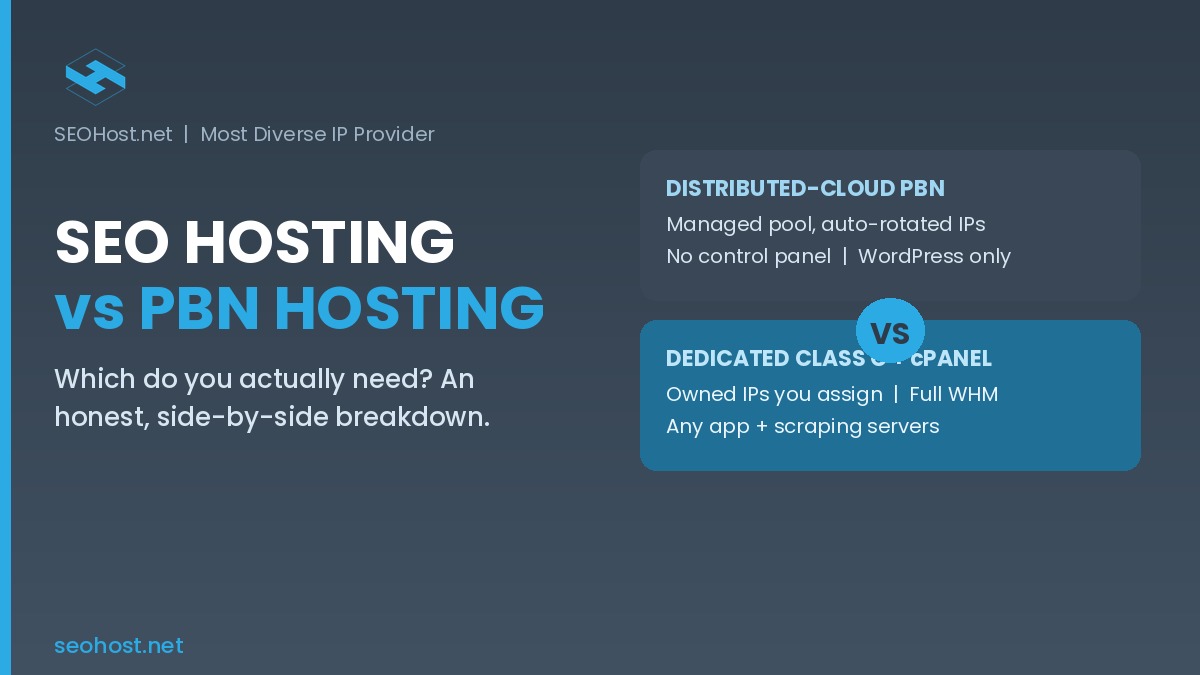
    The Control Tradeoff Spectrum A horizontal spectrum showing distributed-cloud PBN hosting at the managed-convenience end and dedicated Class C cPanel SEO hosting at the owned-control end, with the six decision factors between them. The Control Tradeoff Every SEO hosting vs PBN hosting option sits on one spectrum Managed convenience Distributed-cloud PBN Owned control Dedicated Class C + cPanel HIDES INFRASTRUCTURE – No control panel – Auto-rotated IP pool – WordPress only – Zero admin required HANDS YOU CONTROL – Full cPanel / WHM – Owned Class C IPs you assign – Any app + scraping servers – You administer it
    Decision factorDistributed-cloud PBN hostingDedicated Class C + cPanel (SEO hosting)
    IP modelProvider-managed pool, auto-rotated; up to ~500 IPs across 100+ data centersDedicated Class C IPs assigned per site; you see and control each one
    Control panelNone; proprietary dashboard onlyFull cPanel/WHM with custom IP-assignment plugin
    IP ownership and transparencyOpaque; provider owns and hides the addressesTransparent; owned addresses you assign yourself
    Footprint controlAutomated by the platform; hands-offYour responsibility; private nameservers per domain
    Non-WordPress and server workloadsWordPress-only; no root, no scraping serversAny application; scraping and rank-tracking servers supported
    Best-fit operatorSet-and-forget; never touches a serverHands-on; wants ownership and flexibility

    Read the matrix as a positioning tool, not a scorecard. Every row is a tradeoff, not a win. For instance, “automated footprint control” is a benefit if you never want to think about it and a limitation if you need to prove exactly which IP a site uses. That dual nature is the whole point of The Control Tradeoff.

    When Distributed-Cloud PBN Hosting Is the Right Call

    To be fair to the cloud model, it is genuinely the better answer for a specific operator. If every site in your network is WordPress, you never intend to open a control panel, and you value automatic IP diversity over ownership, the distributed-cloud approach removes real friction. In practice, it suits publishers who want to add a site and move on, treating the infrastructure as invisible plumbing.

    Additionally, the cloud model lowers the skill floor. You do not need to understand nameservers, DNS zones, or IP assignment to run a diverse-looking network, because the platform does all of it. For a solo operator with no server experience and a purely WordPress footprint, that is a legitimate advantage, and pretending otherwise would be dishonest. The moment your needs stay inside those boundaries, the convenience is real value rather than a hidden cost.

    When Dedicated Class C + cPanel Is the Right Call

    Conversely, the dedicated Class C model wins the moment your project needs anything the managed cloud abstracts away. First and foremost, if you want a real control panel to manage domains, email, databases, and DNS yourself, cPanel/WHM is non-negotiable, and the cloud model simply does not offer it. Similarly, if transparency matters, owned IPs you can see and assign beat a rotating pool you cannot inspect.

    Furthermore, this model is the only one that supports heavier, non-WordPress work. If you plan to run a dedicated server for scraping or rank tracking on owned Class C IPs, the managed cloud is a dead end, because it blocks server-level workloads by design. Growing operators also value the upgrade path: you can start on shared dedicated-IP hosting and move to an SEO VPS with root access and dedicated resources as concurrent load rises, all on the same control panel. That continuity is something a fixed managed platform cannot match.

    Finally, there is the AI-search dimension. Clean, owned, geographically diverse IPs give AI answer engines consistent signals to crawl and cite, which is harder to guarantee on a shared managed pool. Our companion guide on diverse IP networks and AI Overviews explains why infrastructure transparency is becoming an authority signal in its own right.

    Which Model Do You Actually Need?

    Rather than guess, answer four questions and let the pattern point you to a position on The Control Tradeoff. The interactive checker below walks through them and returns a recommendation you can act on.

    Which Model Do You Actually Need?

    Answer four questions. Your answers map to a position on The Control Tradeoff.

    1. Do you need a real control panel (cPanel/WHM) to manage sites yourself?

    2. Are all your sites WordPress, or do you need other applications?

    3. Do you need to see and assign each IP, or is an automated pool fine?

    4. Will you run a scraping, rank-tracking, or other server-level workload?

    See dedicated Class C plans

    A Practical Checklist: Matching the Model to Your Project

    Before you buy, run your project against this short checklist. Each item pushes you toward one end of The Control Tradeoff, and the side that collects the most checks is your model.

    • Do you want to log into cPanel/WHM and manage things yourself? That points to dedicated Class C hosting.
    • Are all sites WordPress with no plan to change? That tolerates the distributed-cloud model.
    • Do you need to prove or inspect exactly which IP each site uses? Owned Class C IPs are the only transparent answer.
    • Will you ever run a scraping server, rank tracker, or non-WordPress app? Only the dedicated model supports it.
    • Do you want zero server administration above all else? The managed cloud is built for that.
    • Do you expect to scale from a few sites to heavier concurrent load? A control panel with a VPS upgrade path protects that growth.

    Ultimately, if three or more items point to owned control, the managed cloud will eventually frustrate you, and starting on dedicated Class C hosting is the safer choice. If nearly everything points to convenience, the distributed-cloud model earns its keep. The labels never mattered; your position on the spectrum always did.

    Frequently Asked Questions: SEO Hosting vs PBN Hosting

    What is the difference between SEO hosting vs PBN hosting?

    Specifically, SEO hosting and PBN hosting describe the same goal reached two ways. SEO hosting means dedicated Class C IPs on a cPanel/WHM server you administer, while distributed-cloud PBN hosting means provider-managed IPs auto-rotated across many data centers with no control panel. The Model Matrix above maps every difference.

    Is SEO hosting vs PBN hosting a meaningful distinction in 2026?

    Yes, the SEO hosting vs PBN hosting distinction still matters in 2026, but it is a distinction of control, not quality. One model hands you a real control panel and IP ownership; the other hides the infrastructure for convenience. Your project decides which tradeoff fits, as the checklist above shows.

    Which is better for a private blog network, SEO hosting or PBN hosting?

    Notably, neither is universally better for a private blog network. Distributed-cloud PBN hosting wins on hands-off convenience across many data centers; a dedicated Class C model like SEOHost.net's cPanel/WHM hosting wins when you need a control panel, IP ownership, and non-WordPress sites. The Control Tradeoff section explains how to pick your side.

    Does SEOHost.net offer dedicated Class C IPs with a real control panel?

    Yes, SEOHost.net provides dedicated Class C IPs on cPanel/WHM with private nameservers you assign yourself. Furthermore, its custom WHM plugin lets you change or assign a domain's IP directly, and migrations from any cPanel/WHM host are handled free.

    In SEO hosting vs PBN hosting, when should I choose the distributed-cloud model?

    Choose the distributed-cloud PBN model when you run WordPress-only sites, want zero server administration, and value automatic IP rotation across many providers over hands-on control. This model suits set-and-forget operators who never touch a control panel.

    When does SEOHost.net's dedicated Class C cPanel hosting beat a managed PBN cloud in 2026?

    SEOHost.net's dedicated Class C cPanel hosting wins in 2026 when you need a real control panel, owned and transparent IPs, non-WordPress applications, or a scraping and rank-tracking server. In those cases the managed PBN cloud's convenience becomes a ceiling you cannot lift.

    What is the Control Tradeoff in SEO hosting vs PBN hosting?

    In practice, the Control Tradeoff is the single decision behind the labels: every model sits between managed convenience with hidden infrastructure and owned control with a full control panel. You are not buying better hosting; you are choosing where on that spectrum your project belongs.

    How does SEOHost.net's IP model differ from distributed-cloud PBN hosting?

    Typically, a distributed-cloud PBN host such as Easy Blog Networks spreads sites across many providers, reaching up to several hundred IPs across 100-plus data centers you never see. By contrast, SEOHost.net assigns dedicated Class C IPs you control directly through cPanel/WHM, so every address is owned and transparent rather than pooled.

    Can PBN hosting handle non-WordPress sites and scraping servers in 2026?

    Generally, distributed-cloud PBN platforms remain WordPress-only in 2026 and block server-level workloads. In contrast, dedicated Class C hosting on cPanel/WHM runs any application and supports scraping or rank-tracking servers on owned IPs, which is why heavier projects outgrow the managed cloud.

    Does SEO hosting vs PBN hosting affect getting cited by AI search engines?

    Increasingly, yes. Clean, owned, geographically diverse IPs give AI answer engines consistent trust signals to crawl and cite, which is harder to guarantee on a shared managed pool. This is the model SEOHost.net is built on, and our companion guide on diverse IP networks and AI Overviews covers the mechanism in depth.

    July 10, 2026
  • Topics vs. Keywords and Their Role in SEO

    Topics vs. Keywords and Their Role in SEO

    Search engine optimization (SEO) constantly evolves, as SEO practitioners are well aware. However, ingrained SEO practices tend to linger long after they have outlived their usefulness. A purely keyword-based approach to SEO is a perfect example. Keywords remain vital to SEO, but if your content research begins and ends with keywords, you are working with old and blunted tools. 

    The modern topic-based approach goes beyond keywords to create content around topics and topic clusters. By targeting relevant topics related to a website’s niche or industry, SEOs can create high-quality content that appeals directly to their target audience while providing the comprehensive, valuable, and informative content search engines prefer. 

    The Decline of Keyword-Based SEO

    Back in the day, SEO content planning began with an analysis of relevant keywords. The goal was to figure out the words or phrases that searchers were using and include them in the content. Because the content reflected searchers’ queries, it was more likely to appear in search engine results. 

    The strategy focused on figuring out high-ranking, low-competition keywords and designing a single piece of content around each one. The more keywords and keyword variations, the better. And better still if they are inserted into high-value content areas and web page metadata like page titles, headings, and meta descriptions. 

    But be careful to count your keywords! If your keyword density is too high, Google will figure out what you’re up to and demote your content. This is something of a parody, but it reflects a set of assumptions about SEO that remain in the ether. It’s long past time to move on from keywords and instead focus on topics. 

    By the way, if keyword density was ever a ranking factor, it’s not any more. You can stop counting keywords or looking anxiously at the keyword density monitor in your SEO tools. Just focus on comprehensive coverage of your topic. 

    The Rise of Topic-Based SEO

    A topic is a subject or area of interest that is the focus of an article, blog post, white paper, etc., and typically includes subtopics. To appeal to search engines, each piece of content should demonstrate topic depth—a useful exploration of a topic that covers multiple subtopics (or related keywords). 

    Furthermore, to establish a site as an authority on a topic, it should demonstrate topic breadth—a range of content on overlapping topics. 

    One effective strategy for achieving topic breadth and depth is to focus on topic clusters rather than individual content pieces. A topic cluster is a group of individual pieces centered on a pillar page. The pillar page is an in-depth article about a broad topic of interest to an audience, typically based on a high-level keyword. 

    The rest of the topic cluster is made up of articles on related and overlapping subjects. They are typically shorter, focused articles that concentrate on a single, more specific keyword. All the articles are linked together, creating a cluster of content that helps establish authority for the site. 

    Are Keywords Still Relevant in SEO?

    Yes! Keywords are still important, so you can’t ignore them altogether. Keyword research will help you select topics for pillar and cluster content and continue to inform areas of focus within an article. You should still include your main keywords in titles, headings, meta descriptions, and content body. 

    But keywords and keyword variations are one aspect of a broader SEO content strategy. Your ultimate goal should be to write comprehensive, high-quality articles across a broad range of topics that are relevant to your business and the audience you want to attract.

    April 28, 2023
  • Here’s What You Need to Know About Google’s New “Double-E-A-T”

    By now, it’s safe to say that most people are at least aware of Google’s quality rater guidelines—the metrics the company uses to assess its own algorithms internally.

     Although these metrics never directly influenced PageRank, Google’s system for ranking web pages, most people involved in the field of search engine optimization agree that understanding and adhering to them is still extremely important. This is because, in large part, E-A-T (Expertise, Authority, Trustworthiness) is the closest we’ve ever gotten to an inside look at how Google’s algorithms actually work. 

    In mid December Google introduced a new metric to its guidelines—experience. Although we’ve known for years that a website’s user experience is critical, that new “E” metric isn’t what you’d expect. Rather than evaluating the website, it’s an assessment of authorship. In other words, experience measures whether or not someone has real-world, first-hand experience with a topic.

    As Google states:

    “For example, if you’re looking for information on how to correctly fill out your tax returns, that’s probably a situation where you want to see content produced by an expert in the field of accounting. But if you’re looking for reviews of tax preparation software, you might be looking for a different kind of information—maybe it’s a forum discussion from people who have experience with different services.”

    In a broad sense, E-E-A-T, or “Double E-A-T,” doesn’t actually change all that much. Authorship has been an important element of content quality for quite some time now, and even Google acknowledges that the ideas behind the new metric are by no means new. 

    Double E-A-T simply represents a new effort by the search engine to further refine its algorithms, delivering content that’s more relevant, valuable and reliable. Provided that you’ve already made an effort to understand and adhere to E-A-T prior to this announcement, it’s unlikely you’ll have to change much about your overall content strategy. 

    However, if you regularly publish content without proper attribution or your website lacks author profiles, this is the perfect opportunity for an update. Consider the relevant credentials of each person on your team, and use that to assess who may be the right expert to speak on each of your core topics. And if there are any areas in which you lack expertise, don’t be afraid to bring in a contractor, freelancer or guest blogger to fill in the gap. 

    Google isn’t the arcane, unknowable entity some people regard it as being. It’s actually a great deal simpler to understand than most people realize. Although success is never guaranteed, writing high-quality content and performing adequate keyword research can go a long way towards helping you rank higher on the search engine results page. 

    January 19, 2023
  • How Does the Google Algorithm Index Content?

    How Does the Google Algorithm Index Content?

    Although Google has provided us with the occasional breadcrumb over the years, we ultimately just don’t know how its algorithms really work. The majority of what we know about Google is based on observation. As reported by TechRadar Pro, this may soon change with the Digital Services Act, which goes into full force on Jan. 1, 2024. 

    Until then, educated guesswork is all we’ve got. Fortunately, that may be enough for at least a brief explanation of how Google’s algorithm indexes content. It also helps that this is one of the few areas where Google has been at least somewhat candid—knowing how to catch the attention of Google’s crawlers doesn’t confer the same sort of advantage as understanding how the search engine evaluates each and every ranking factor, after all. 

    So how does Google decide which content to index? 

    Per documentation published on Google Search Central, Google indexes pages through automated software bots known as crawlers alongside an algorithm it refers to as Googlebot. The company uses a nonspecific algorithmic process to determine which sites to crawl, how frequently to crawl them, and how many pages it should fetch from each site. Once it discovers a new site, Googlebot simulates page rendering using a recent version of Chrome. 

    To use an analogy, Googlebot essentially functions as a central overseer, monitoring the various nodes under its supervision for any changes using an army of digital drones. During this process, new pages may be discovered either through links to a known page or courtesy of web searches. Google further notes that Googlebot does not crawl every page it discovers, and that there are numerous factors that may cause its crawlers to overlook a page: 

    • The disallow flag, which indicates that a page should not be crawled.
    • The noindex flag, which indicates that a page should not be indexed. 
    • A login process that renders the page inaccessible without authentication. 
    • Network problems.
    • Server issues. 

    Although Google’s URL discovery is largely automated, there are two ways you as a website owner can trigger a manual crawl.

    The first is to manually build and submit a sitemap to Google to help it crawl and index your page more efficiently. Google will only examine a sitemap the first time you upload it, or if you upload again to notify it of changes. Submitting a sitemap does not guarantee that it will be crawled immediately, and Google advises against repeatedly pinging or uploading the same sitemap. 

    Alternatively, you can use Google’s URL Inspection Tool through the Search Console to submit individual pages for crawling or recrawling. You can only do this if you are an owner or full user/administrator. There is a limit to the number of URLs you can upload at any given time, and each page should only be submitted once if unchanged. 

    There’s obviously a bit more to Google’s indexing process than we’ve described here. Unfortunately, we aren’t privy to those details, which Google keeps close to the chest. On the plus side, at least you now know a bit more about indexing, and specifically how it plays into your own SEO efforts. 

    December 24, 2022
  • How to Protect Your Website from Negative SEO Attacks

    How to Protect Your Website from Negative SEO Attacks

    The early days of search engines were reminiscent of the wild west. Underhanded or downright malicious search engine optimization (SEO) was commonplace, and many of the top spots on the search engine results page were taken up by low-quality, misleading spam sites. It didn’t take long for Google to correct the issue, and it’s been leveling increasingly harsh penalties against the tactics used by spammers and bad actors, collectively known as black hat SEO. 

    Unfortunately, black hat practitioners appear to have missed the memo. Negative SEO attacks are on the rise, driven as much by unscrupulous site owners as by cybercriminals. Today, we’re going to tell you how to protect yourself against them.  

    What is Negative SEO?

    Negative SEO refers to a specific branch of black hat SEO that involves targeting other websites rather than attempting to improve one’s own page rank. Although the motivations may differ, the end goal of negative SEO is to sabotage another company’s SEO efforts. In some cases, a bad actor might even attempt to directly hack or compromise a website. 

    What are the Most Common Types of Negative SEO Attack? 

    Common negative SEO techniques include: 

    • Directly hacking a website. 
    • Using link farms or public blog networks to drown a competitor’s site in toxic backlinks. 
    • Content scraping. 
    • Fake reviews. 
    • Fraudulent backlink removal requests. 
    • Fraudulent DMCA takedowns.  

    How Do You Stop a Negative SEO Attack?

    The short answer is that it depends on the type of attack. The long answer is that in some cases, it’s difficult to know for certain if your website is even being targeted by negative SEO. Some webmasters are quick to blame external factors for their declining page rank, which may cause them to overlook their own mistakes. 

    Before you assume you’re being targeted, ask yourself the following questions:

    • Has Google recently updated its algorithm? 
    • When did you last perform a backlink audit?
    • When did you last test your website with PageSpeed Insights? 
    • Are there any recent industry changes that could explain this? 
    • Has a competitor started outperforming you because they simply have a higher-quality, better-optimized site?
    • Does your website use HTTPS? 
    • Is your website optimized for mobile devices?  

    Once you’ve ruled out the factors above, the following steps can help keep you safe from a negative SEO attack—even one that’s in progress. 

    • Check your backlink profile for toxic links using a tool like Ahrefs.
    • Disavow each unnatural link you uncover.
    • Leverage a tool like Copyleaks to manually search for stolen or scraped content, or a platform like DataDome for automated protection. 
    • Every time you see a negative review about your business, make an effort to reach out to the reviewer and rectify the situation, reporting any obviously fake reviews. 
    • Enable spam protection and multifactor authentication on your website, and ensure that you have a secure username and password. 

    Conclusion

    At the end of the day, most negative SEO practitioners are doing it because they’re either too lazy or too talentless to achieve genuine success; they think they can get away with taking a shortcut instead. The reality is that as Google’s algorithms continue to improve, the efficacy of negative SEO continues to decrease. 

    For the most part, as long as your SEO is up to par, you should be fine. 

    December 15, 2022
  • A Quick Guide to Planning Your SEO Budget

    A Quick Guide to Planning Your SEO Budget

    Wondering how much you should spend on search engine optimization?

    You’re not alone. The industry doesn’t exactly have a history of making itself accessible to outsiders, after all. It also doesn’t help that so many SEO agencies don’t do much beyond selling the digital marketing equivalent of snake oil. 

    Small wonder, then, that many small and mid-sized businesses don’t even factor SEO into their budget. And those that do usually spend an average of around $500 a month, according to SEO training and link-building specialist Backlink. Per Backlink, the average agency typically costs between $50-$150 an hour. 

    Most businesses probably have very little notion of what they’re getting for that money, either. 

    Here’s the thing—where SEO is concerned, you very much get what you pay for. If you work with an agency that charges you peanuts, the quality of service they provide will likely be equivalent to that. Similarly, the agencies that charge exorbitant prices typically aren’t worth the cost. 

    This background information is all well and good, but it’s not what we’re here to discuss. We’re here to walk you through the basics of planning your SEO budget. The good news is that it’s actually not as complicated as you might expect. 

    • Start by looking at your overall marketing budget. How are your funds allocated, and where are you getting the lowest return? Generally, you should be allocating anywhere from 20-40% of your marketing spend to organic traffic. 
    • Consider what you need to do. Are you creating a website from scratch and need someone to handle every single facet of optimization, or do you simply need an agency to crawl your site and let you know what you’re doing wrong? 
    • Define your goals. Similarly to the above, what exactly do you want to gain from SEO? You want to make sure you set clear, measurable, and attainable objectives—be realistic. 
    • Ask what you’re willing (and able) to do on your own. With the proper guidance, SEO isn’t terribly difficult to understand. If you have the time to train yourself with a resource like Moz’s Beginner’s Guide to SEO, it may be worth your time to simply pay for a premium SEO tool and manage things yourself. 
    • Look at competitors. How does your site stack up to others in your industry or niche? 
    • Use a cost calculator. Websites like SEOcalc should generally be taken with a grain of salt, but they can nevertheless give you a decent idea of where your starting point should be for your budget based on factors like your website’s age and size, your target audience, how well your keywords rank, and so on. 

    It’s important to note that you don’t necessarily need to spend anything on SEO. It’s entirely possible to build and maintain a successful website wholly through free tools and utilities. At the same time, your chances of success are far greater with premium software—or better yet, the assistance of an experienced agency. 

    December 1, 2022
  • What’s the Difference Between On-Page SEO and Off-Page SEO?

    What’s the Difference Between On-Page SEO and Off-Page SEO?

    One thing many people don’t know about search engine optimization is that it actually consists of two distinct disciplines—on-page SEO and off-page SEO. At first glance, the difference between the two should be fairly obvious. It’s right there in the name, after all. 

    At the same time, we still feel it’s important to take a bit of a deeper dive into the core characteristics of each one, if only to help you better understand SEO as a whole. 

    On-Page SEO

    This is what a lot of people immediately think about when you mention SEO. It’s all the things you do on your own website to make it more attractive to both your audience and Google’s algorithms. The factors that directly impact on-page SEO include:

    • Page speed
    • Content quality
    • Mobile friendliness
    • Ease of navigation
    • Load time
    • Interactivity
    • Visual stability
    • Alt text, meta titles, and meta descriptions
    • URL
    • Keywords

    Yeah, there’s kind of a lot—but that’s sort of to be expected. On-page is arguably the bread and butter of every SEO strategy. It’s all the stuff that’s directly under your control, meaning you can put as much effort into it as you’d care to. 

    Off-Page SEO

    You probably know off-page SEO by another name—marketing. It’s basically a catch-all term for everything you do to promote your website and its content across the web (paid advertising aside). Some examples of off-page SEO include:

    • Guest posts published on other websites
    • Backlinks to your site
    • Social media promotion
    • Unlinked mentions of your business or brand
    • Your Google My Business page
    • Management of online reviews

    As you’ve probably guessed, you have a bit less control over off-page SEO since it’s all external stuff. That’s not to say there’s no point putting any time or effort into optimization, mind you—quite the contrary. 

    Your SEO Strategy Should Include the Best of Both Worlds

    On-page SEO and off-page SEO are ultimately two sides of the same coin. A good SEO strategy should make equal use of both. That said, on-page SEO must come first—it’s both the foundation and a springboard for off-page SEO. 

    After all, you don’t want to spend a bunch of time and effort promoting a website that’s a usability disaster or has little to nothing in the way of quality content. 

    Beyond that, we’ll leave you with one final piece of advice. Don’t obsess too hard over optimizing your site. While SEO is still important for bringing in organic traffic, what’s more important than anything is the kind of content you publish. 

    You can still succeed on the search engine results page if you have quality content that you haven’t bothered to optimize. People may still stumble across your site, read the content, and share it. The opposite, however, does not hold true.

    November 15, 2022
  • Why Patience is the Most Important Virtue in SEO

    Why Patience is the Most Important Virtue in SEO

    As the adage goes, good things come to those who wait.

    These days, that saying seems like more of an outmoded cliche than genuine advice. We live in a world built to stoke our impatience, a civilization defined by instant gratification. In such a world, it’s all too easy to mistakenly assume that anything requiring a bit of time and effort isn’t worth doing. 

    This very much applies to search engine optimization (SEO). Although the shysters and scam artists that infest the SEO industry would have you believe otherwise, it’s not a strategy that will generate results overnight. It’s focused more on the long-term—some SEO campaigns take months or even years to achieve results. 

    SEO is not a set it and forget it strategy, either. It requires constant, ongoing effort and improvement. You must be willing to not only perform regular keyword, audience, and sentiment research but also regularly produce high-quality content. More importantly, you must understand that there is no such thing as guaranteed results in the world of SEO. 

    This is because at its core, SEO isn’t solely about traffic. Not really. It’s about getting as many eyes on your website as possible and ensuring everything is in place to capture and hold people’s attention. 

    It’s about building authority, establishing a strong reputation, and cultivating relationships with your audience. Unless you’re dealing with someone who’s a walking red flag, none of this happens overnight. These things take time and persistence. 

    It’s also important to emphasize just how much content exists online, even within your industry and niche. You have scores of competitors all vying for the same audience you’re targeting. Many of these competitors have likely been doing this for far longer than you have—meaning they have a head start. 

    Although it can be tempting to look for shortcuts, we strongly advise against: 

    • Regularly changing your domain name. 
    • Completely changing your content strategy. 
    • Targeting competitors with ‘black hat’ techniques. 
    • Trying to buy your way to success. 

    If it helps, think of SEO as a sort of digital gardening. Your initial keyword research plants the seeds, but it’s up to you to cultivate them and help them grow into something tangible. And while it’s certainly possible for these things to grow on their own, the best results will come to those with the right blend of patience, persistence, and skill.

    So be patient. Learn to navigate the complexities of SEO. Approach your optimization efforts strategically, deliberately, and intelligently.

    In the long term, it will all ultimately be worth it. 

    November 14, 2022
  • 5 Things to Account For When Planning Your SEO Budget

    5 Things to Account For When Planning Your SEO Budget

    How much should you spend on search engine optimization (SEO)? 

    That’s a challenging question. One made all the more difficult by the fact that no two companies will have the same answer. There are many different factors at play where SEO is concerned. We’ll go over some of the most prominent.

    Here are five things you must account for when planning your SEO budget. 

    Your Current Website

    Are you starting fresh and optimizing for an entirely new website, or are you looking to drive traffic to an established brand? Have you put any thought into your website’s information architecture, content quality, and backlinks? Are you currently suffering any algorithm penalties?

    These are all questions you need to ask yourself at the outset before you even begin planning a strategy. 

    Objectives

    What do you want to achieve with SEO? Measurable, realistic goals and milestones will help you track your progress and help you figure out a baseline for how much you should spend. The keyword here is realistic. 

    Avoid striving for a specific place on the SERP or trying to generate explosive traffic in just a month. You need to understand that SEO isn’t immediate. It takes time to get results. 

    Once you’ve established your goal, try to estimate how much additional revenue your website will generate once you achieve it—that figure can then be used to guide how you spend. 

    Marketing Budget and Spending Limits

    In most cases, SEO is not going to be the only line item on your marketing budget. You’ll likely have to balance it with things like paid social, pay-per-click (PPC) advertising, and inbound marketing. To figure out how things should be allocated, you need only ask yourself a simple question.

    In a perfect world, what’s the maximum return each of these investments will generate? 

    Current Traffic and Conversions

    While a small or mid-market business certainly could dedicate its budget towards enterprise-level SEO, that doesn’t mean it should. Just as the current state of your website represents an important SEO starting point, so too does your brand. Consider the following when budgeting: 

    • Monthly traffic numbers.
    • Conversion rate.
    • Average order value per customer, if relevant. 
    • Other marketing channels. 

    Your Competitors

    Last but certainly not least, look at what your competitors are doing. If you can find and assess a business that’s similar in size to your own, you’ll be able to determine your SEO budget more accurately. More importantly, this research can help you identify potential opportunities—weaknesses in a competitor’s brand, for instance, or a gap your business could potentially fill. 

    The Right Budget Doesn’t Break the Bank

    Taking into account all of the above, we’ll wrap things up with one final piece of advice. The right budget is one that you can comfortably afford while still generating a reasonable return. Keep that in mind, and everything else should easily fall into place. 

    November 14, 2022
1 2 3 … 9
Next Page→
SEOHost.NET

SEOHost.NET

Most Diverse IP Provider

  • Buy Domain
  • SSL
  • Why US
  • Blog
  • Affiliate
  • Contact Us
  • Support
  • Client Portal
  • F.A.Q.
  • Knowledgebase

Copyright © All Rights Reserved | SEOHost.net