- What SEO VPS Hosting Actually Changes (And What It Does Not)
- Five Signals You Have Outgrown Shared SEO Hosting
- Three Symptoms That Look Like an SEO VPS Hosting Problem But Are Not
- The SEOHost VPS Crossover Table
- The Break-Even Calculation That Does Not Work
- Sizing SEO VPS Hosting: Which of the Four KVM Builds
- What Does Not Come With You From Shared Hosting
- SEO VPS Hosting on SEOHost Infrastructure
- A Practical Checklist: Shared, VPS, or Neither?
- Frequently Asked Questions About SEO VPS Hosting
- SEO VPS hosting vs shared SEO hosting in 2026: which one actually improves rankings?
- When should I move to SEO VPS hosting if I run 30 WordPress sites on distinct Class C IPs?
- Does moving to a VPS change how diverse my Class C IP addresses are?
- How many Class C IPs can I attach to an SEOHost SEO VPS hosting plan?
- SEO VPS vs SEO dedicated server: which suits a network of 100 sites?
- What CPU and memory do the four SEOHost KVM builds provide in 2026?
- Why is outbound SMTP closed on every SEOHost VPS, and what should I use instead?
- Can SEO hosting with multiple IPs run on one VPS instead of separate accounts?
- Is SEO VPS hosting worth the cost in 2026 if I only need more IP addresses?
- Do I need SEO VPS hosting for a small site, or is shared hosting enough?
SEO VPS hosting buys allocated resources, root access and software freedom. It does not buy more IP diversity, so upgrade when a capability is blocked, never when a site counter passes a number.
Almost every page written about SEO VPS hosting is written by somebody selling the upgrade, which is why they all reach the same conclusion. Buy the bigger tier. Grow into it. The awkward part, which a sales page has no reason to mention, is that the thing most people buy an SEO VPS for is the one thing it does not change.
Consequently this post is organized around the capability test: what a VPS genuinely gives you, the five signals that mean you have outgrown shared hosting, three symptoms that look identical and are not, and why the popular break-even calculation is the wrong sum.
What SEO VPS Hosting Actually Changes (And What It Does Not)
An SEO VPS and a shared Class C account solve the same first problem in exactly the same way: every site gets its own dedicated, non-consecutive address. Below that starting point the two tiers diverge completely; above it they do not diverge at all. Separating those two statements is most of the decision.
The Three Things a Virtual Private Server Actually Buys
First, resources that belong to you. On shared hosting your processor time and memory are a slice of a pool, enforced by named caps rather than by good manners: the CloudLinux limits documentation lists SPEED as a percentage of a single core and PMEM as a memory ceiling per account. A KVM instance replaces that arrangement with an allocation. KVM is full hardware virtualization built on a loadable kernel module, so the vCPU and RAM you buy are yours whether you use them or not.
Second, root: a shared control panel decides which PHP extensions exist and which daemons may run, and root removes that committee. Third, independent scaling, because the instance and the addresses are separate orders.
The One Thing SEO VPS Hosting Does Not Buy: IP Diversity
Diversity is a property of the addresses, not of the machine they are bound to. Our pools hold 1,300 or more genuinely distinct Class C blocks across 800 American and 500 European addresses, and both tiers draw from them. Five addresses on a VPS and five on a shared account are therefore indistinguishable to anything performing neighbor analysis.
That matters because IP separation is why most people arrive at this page. If the requirement is purely a wider footprint, the honest answer is more addresses on shared Class C hosting, not a bigger machine. Sites that need separation wider than the third octet need a different address class rather than a different server, which is what first-octet separation exists for. Our reassessment of whether Class C ranges still matter in 2026 works through what the diversity actually buys.
Five Signals You Have Outgrown Shared SEO Hosting
Every signal below is a blocked capability rather than a size threshold. Notably, that distinction separates a real upgrade from an expensive one: two hundred quiet sites can sit on shared hosting indefinitely, while one site can justify a VPS alone.
First Signal: Software the Control Panel Will Not Install
The clearest trigger is a dependency that is not on offer. A shared panel exposes a fixed set of PHP versions and extensions, and the PHP release schedule moves underneath it on its own timetable. When your application needs an extension, a runtime or a database the panel has never heard of, no amount of tuning closes that gap.
Second Signal: Jobs That Get Killed Before They Finish
Resource caps do not slow a long job down; they terminate it. An import, a full-site backup or a crawl that repeatedly dies partway through is hitting a ceiling rather than a bug, and the symptom is the same every time: the job runs fine on a small dataset and fails on the real one.
Third Signal: A Process That Has to Stay Resident
Scheduling has a floor on shared hosting, and it is one minute. As the crontab specification puts it, cron examines its entries every minute, so anything needing a shorter interval is not a cron job at all. Queue workers, headless browsers, webhook listeners and rank-tracking daemons need a process that stays alive between requests, which is a root requirement rather than a preference.
Fourth Signal: You Need a Stack, Not a Site
Some workloads are several services that happen to include a website. An automation rig, a container host, a local inference box or a private network endpoint are stacks rather than sites. Our USA builds deploy from ready-made images for this reason, with Docker, n8n, Laravel, WordPress, Ollama, OpenVPN and CloudPanel available at boot.
Fifth Signal: You Cannot Reproduce Your Own Environment
The last signal is the quietest. When nobody can say which PHP version, extensions and cron entries a site depends on, the environment has become undocumented infrastructure. A server you administer yourself can be rebuilt from a description; a shared account cannot.
Three Symptoms That Look Like an SEO VPS Hosting Problem But Are Not
By contrast, the three complaints below send people toward SEO VPS hosting every week and are almost never solved by one. Each has a cheaper fix that works better.
The first is a slow site. Server response time genuinely matters, and Time to First Byte exposes it, but a slow page is far more often an uncached page, an unindexed database query or a heavy plugin than a starved server. Move it to a bigger machine and it stays slow, at a higher rate.
The second is a footprint that still looks connected despite diverse addresses. That is usually the nameserver layer: fifty distinct addresses answering to one shared nameserver pair rebuild the pattern the addresses were bought to remove. Private nameservers per domain are included on both tiers.
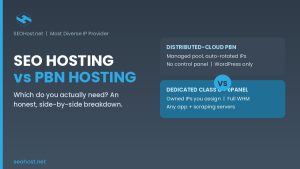
The third is a ranking drop blamed on hosting. In fact hosting explains very few, and those usually involve address reputation rather than server class. Our comparison of SEO hosting and PBN hosting covers where that distinction actually bites.
The SEOHost VPS Crossover Table
The table below is the whole comparison in one place, with the rows that change separated from the rows that do not. Every value comes from the live USA product pages as of August 2026. Read the diversity row first: it is identical in both columns, and most upgrade advice omits it.
| What you are comparing | Shared Class C hosting | SEO VPS |
|---|---|---|
| Class C IP diversity | Non-consecutive blocks, 1,300+ pool | Identical pool, identical blocks |
| CPU and memory | Pooled slice, named per-account caps | Allocated, 2 to 16 vCPU, 4 to 32 GB |
| Root and SSH | Panel access only | Full root, own kernel |
| Software control | Panel decides extensions and daemons | Anything the OS will run |
| Scheduling floor | cron, one minute minimum | Any resident process, any interval |
| Control panel | cPanel and WHM included | Optional paid license, not bundled |
| Address ceiling | 2 to 800 per USA account | Same ceiling, attached as needed |
| Activation | Instant | Instant |
| Outbound SMTP | Closed | Closed |
| Migration help | Free, we do the work | Not bundled |
Reading the Crossover Table
Four rows are the same in both columns, and they include the one people upgrade for. Six rows differ, and each describes control over software rather than position on a network. As such the table answers the SEO VPS hosting question directly: if none of the six describes something you currently need, the upgrade buys headroom you will not use.
Two rows move in the wrong direction, which vendor comparisons rarely highlight: the control panel license and the migration, both included on shared hosting and neither bundled on a VPS.
The Break-Even Calculation That Does Not Work
The arithmetic people attempt is to divide the monthly VPS price by the per-address shared rate, producing a count at which the VPS supposedly pays for itself. That sum is wrong, and wrong in a way that consistently favors the more expensive tier.
The reason is that addresses are a separate order on both tiers. A VPS ships with one primary address; every Class C address beyond it is bought as it would be on shared hosting, out of the same pool and in the same volume bands. Therefore the server price is an additional line rather than a substitute for the address line.
What to Compute Instead: the Root Premium
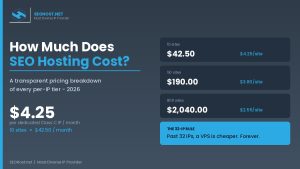
What is worth computing instead is the root premium. Take the monthly price of the smallest build that fits, add a control panel license if you want one, subtract nothing for addresses, and ask whether the blocked capability is worth that figure every month. As of August 2026 the entry USA build starts at $55.00 per month on a two-year term against $2.63 per address per month on shared hosting at the deepest band; both numbers move, so read them from the current European and American build pages rather than from any article, including this one. Our transparent breakdown of what SEO hosting costs explains how the bands interact with billing terms.
One detail in those bands is worth knowing first. The volume rate applies to the whole order rather than to the addresses above a threshold, so crossing a band lowers the price on the addresses you already hold. Growing an allocation is consequently cheaper per address than starting at that size.
Sizing SEO VPS Hosting: Which of the Four KVM Builds
The four USA builds are steps on one ladder rather than four products. Each is KVM with its own kernel and full root, and each accepts dedicated Class C addresses, so the only question is how much of the machine the workload needs.
| Build | vCPU | RAM | SSD | Shaped for |
|---|---|---|---|---|
| KVM-2 | 2 | 4 GB | 50 GB | One demanding site, a staging box, an always-on runner |
| KVM-4 | 4 | 8 GB | 100 GB | A small WordPress network, or one busy site plus its tooling |
| KVM-8 | 8 | 16 GB | 200 GB | Dozens of sites under one panel, or memory-hungry containers |
| KVM-16 | 16 | 32 GB | 400 GB | Heavy crawls, local models, a whole portfolio on one machine |
Size to the workload rather than the site count, because the two correlate poorly: fifty static brochure sites are lighter than one busy store. Above the top build the next step is not a larger instance but single-tenant hardware, where the machine has no neighbors at all.
What Does Not Come With You From Shared Hosting
Moving up a tier removes constraints and adds responsibilities, and the second half rarely appears in upgrade advice. Three things stop being somebody else’s problem the moment you hold root.
First, the control panel: cPanel and WHM are included on every shared account and become a licensed add-on on a VPS, as does CloudLinux. Second, migration, free on a shared account and a support conversation on an unmanaged root server. Third, patching, backups and the operating system itself.
One policy carries across unchanged, and it surprises people every time. Outbound SMTP is closed on every VPS in the network, not as an account setting but as a standing rule, because one compromised instance sending mail from a Class C range damages every other address drawn from that block. Route transactional mail through an authenticated relay on a submission port, which is what the SMTP specification expects of a modern sending client in any case.
SEO VPS Hosting on SEOHost Infrastructure
What SEO VPS hosting requires from a provider is narrower than a feature list suggests: real KVM rather than an oversold container, addresses from a pool deep enough to stay distinct as the network grows, and the freedom to scale server and addresses independently. We have run instant automated provisioning here since 2009, across 800 American and 500 European addresses out of 1,300 or more Class C blocks.
Rather than comparing providers first, run the check below against what is blocked on your hosting today. It asks the four questions that separate a capability problem from size anxiety.
Blocked Capability Check
Four questions about what your hosting stops you doing today, not how big you are.
A Practical Checklist: Shared, VPS, or Neither?
Work through the six items below before ordering SEO VPS hosting. Each is cheap to get right now and awkward to reverse later.
First, write down the capability that is blocked today, in one sentence. If the sentence will not come, the answer is not a VPS. Second, confirm your addresses are genuinely non-consecutive rather than four steps of one range, a diversity problem no server change repairs. Third, check that every domain resolves through its own nameserver pair.
Fourth, price the control panel deliberately, since it is included on one tier and licensed on the other. Fifth, decide who patches the operating system, because on an unmanaged root server that is you. Sixth, pick the region before ordering, since the American and European pools are drawn separately and moving later is a new order.
Frequently Asked Questions About SEO VPS Hosting
SEO VPS hosting vs shared SEO hosting in 2026: which one actually improves rankings?
Specifically, neither one improves rankings on its own. Both tiers put each site on its own dedicated, non-consecutive Class C address, and that layer is the part neighbor-analysis tools can see. What an SEO VPS changes sits above the network: allocated CPU and memory, full root, and software the shared panel will not install. The crossover table lists every row where the two tiers differ.
When should I move to SEO VPS hosting if I run 30 WordPress sites on distinct Class C IPs?
Typically, the site count is the wrong trigger. Thirty quiet WordPress sites on distinct Class C ranges run comfortably on shared hosting for years. The move is justified when a capability is blocked: a PHP extension the panel lacks, an import job killed by a resource cap, or a process that must stay resident.
Does moving to a VPS change how diverse my Class C IP addresses are?
Notably, it does not. Diversity is a property of the addresses themselves, not of the machine they are bound to, and the same pool of 1,300 or more distinct Class C blocks serves both tiers. Five addresses on a VPS and five on a shared account look identical to neighbor analysis. Anyone selling a VPS as an IP-diversity upgrade is selling the wrong product.
How many Class C IPs can I attach to an SEOHost SEO VPS hosting plan?
In practice, the instance does not set the ceiling; the account does. A USA account runs from 2 to 800 Class C addresses and a European account to 500, drawn from the same pool the shared plans use. Server and addresses are separate orders, so the address count grows without resizing the instance.
SEO VPS vs SEO dedicated server: which suits a network of 100 sites?
Ultimately, the deciding factor is isolation rather than site count. A VPS gives allocated vCPU and memory on shared hardware; a dedicated server gives the whole machine. A hundred low-traffic sites fit inside the larger KVM builds, so the real question is whether any single site justifies single-tenant hardware.
What CPU and memory do the four SEOHost KVM builds provide in 2026?
Specifically, the USA range runs from 2 vCPU and 4 GB of RAM on a 50 GB SSD up to 16 vCPU and 32 GB on a 400 GB SSD, in four steps. Every build is KVM with its own kernel and full root over SSH. The sizing table in this post maps each build to a workload rather than to a site count.
Why is outbound SMTP closed on every SEOHost VPS, and what should I use instead?
Furthermore, outbound SMTP is closed across the whole VPS network as a standing policy, not a per-account setting. The reason is address reputation: one compromised instance sending mail from a Class C range damages every other customer drawn from that block. Route transactional mail through an authenticated relay on a submission port instead.
Can SEO hosting with multiple IPs run on one VPS instead of separate accounts?
Indeed, that is the normal arrangement. One instance holds many virtual hosts, each bound to its own dedicated Class C address, so a network lives on one machine without sharing an address. The trade is concentration: one kernel and one hardware failure now sit under every site you own.
Is SEO VPS hosting worth the cost in 2026 if I only need more IP addresses?
In fact, no. Addresses are ordered separately on both tiers and cost roughly the same either way, so the VPS is an additional monthly line rather than a cheaper route to the same allocation. Shared hosting also includes a cPanel and WHM license that becomes a paid add-on on a VPS. If you need addresses, buy addresses.
Do I need SEO VPS hosting for a small site, or is shared hosting enough?
Overall, shared hosting is enough for a small site, and stays enough for longer than most upgrade advice suggests. The honest test is capability, not size: if nothing you need is blocked by the control panel or a resource cap, a VPS buys headroom you are not using.