Skip to content
Skip to content
  • English
  • Español
  • Deutsch
  • Türkçe
Portal Login Deploy now
USA Hosting
C Class SEO Hosting USA from $2.63/IP/mo3-year term B Class SEO Hosting USA from $3.85/IP/mo3-year term A Class SEO Hosting USA from $5.95/IP/mo3-year term SEO VPS USA from $55.00/mo2-year term SEO Dedicated Server USA from $159.20/mo2-year term
800 dedicated addresses
EU Hosting
C Class SEO Hosting EU from $2.98/IP/mo3-year term B Class SEO Hosting EU from $4.55/IP/mo3-year term A Class SEO Hosting EU from $6.30/IP/mo3-year term SEO VPS EU from $68.75/mo2-year term SEO Dedicated Server EU from $399.20/mo2-year term
500 dedicated addresses
Managed WordPress
WordPress Hosting MANAGED $2.70/mo 3-year term · with a free dedicated IP Build your network $2.63/IP/mo 3-year term · pick region, class and count, and the price updates live
Prices are the monthly equivalent on the longest term.
Domains & SSL
.com.net.org.io.co
Domain Registrationsearch Domain Transferkeep your name SSL Certificatesfree tier
Learn
IP diversity & footprintwhy distinct blocks matter Class C, B or Amatch diversity to budget Migration & setupwe move your sites Nameservers & DNSprivate ns1/ns2 per domain Uptime & backupswhat is actually covered F.A.Q. · 46 answers every question, each on its own page →
Company
New to SEO hosting? Start with what a distinct Class C block actually changes, and what it does not.
About Ussince 2009 Affiliatesrecurring Contact24/7/365 Blogguides Site mapevery page
Trusted since 2009 · Malta

← Blog Home

Tag: seo

  • SEO Hosting vs Multiple Hosts: What Spreading Your Sites Really Costs

    SEO Hosting vs Multiple Hosts: What Spreading Your Sites Really Costs

    • Why People Spread Their Sites Across Multiple Hosts
      • When Multiple Hosts Is Genuinely the Right Call
    • What Google Has Said About Hosting, IPs and Neighbors
    • What Multiple Hosts Does Not Separate
      • Reading the Carry-Over Map
    • The Real Cost of Multiple Hosts Is Not the Bill
      • One Line Item Makes the Point: PHP Versions
    • Pricing Multiple Hosts Honestly: Run the Numbers Yourself
    • What One SEO Host Replaces, and What It Cannot Hide
      • Answering the Concentration Risk Without Thirteen Extra Logins
    • SEO Hosting vs Multiple Hosts: A Decision Rule by Network Size
      • What SEOHost.net Plans Include for This
    • Frequently Asked Questions About SEO Hosting vs Multiple Hosts
      • Is spreading your sites across multiple hosts still worth it for SEO in 2026?
      • Does Google rank a site differently on shared hosting than on dedicated hosting?
      • SEO hosting vs multiple hosts: which one is cheaper for a 14-site network?
      • Which footprints still connect my sites when they sit on multiple hosts?
      • Separate nameservers vs separate hosts: which one does more to split a network?
      • How many sites can you run on multiple hosts before the admin outweighs the savings in 2026?
      • Does SEOHost.net give each site its own Class C IP and nameservers?
      • Can I split one network between two SEOHost.net accounts or locations?
      • Does SEOHost.net check an IP address's reputation before issuing it in 2026?
      • Will moving my sites from multiple hosts to one SEO host affect my rankings?
    TL;DR

    Spreading a network across multiple hosts separates the IP address and the server, and Google has said neither one sets your rankings. Most of the other things that connect your sites, from the registrar record to the analytics ID, move with you to every host. What multiple hosts really adds is admin: a login, a renewal and a PHP schedule per site. For three sites that is a fair trade. Past that, we think one SEO host with separate addresses and nameservers per site is the better one, and the calculator below lets you test that against your own numbers.

    Anyone pricing SEO hosting for the first time runs into the same objection, usually from a forum thread: why pay for it at all, when you could buy a cheap plan at each of multiple hosts and get a different address for every site? It sounds like the frugal, safe answer. Each site on its own provider, nothing in common, no single company holding the whole network.

    Listen: what a different provider for every site really separates, and the admin it adds that never shows on the bill. By Terry Cane, Chief Operating Officer, SEOHost.net.

    This post prices that idea properly, on both of its costs. One is the bill, which you can only add up from your own quotes, and we show you how. The other is everything the bill leaves out: the records that still connect your sites on any host, and the admin that grows with every provider you add. We sell the other option, so we have tried to be fair to this one, including where it wins. By Terry Cane, Chief Operating Officer, SEOHost.net.

    Why People Spread Their Sites Across Multiple Hosts

    The case is not foolish, and it deserves to be stated at its strongest before anyone argues with it. People who split a network across providers usually want one or more of four things.

    First, a different IP address and server for every site, without paying a specialist for them. Second, containment: if one provider has an outage, suspends an account or gets bought and changes its terms, only one site feels it. Third, privacy, because no single company sees the whole portfolio. Fourth, a low entry price, since a basic shared plan for one site is about the cheapest thing in hosting.

    All four are real. The question is what each one costs to get this way, and whether it is the thing that actually protects the network.

    When Multiple Hosts Is Genuinely the Right Call

    For two or three sites that you keep current, multiple hosts works well. The admin is small, the containment is genuine, and nothing in this post should talk you out of it. The same goes for sites that belong to different businesses or different owners, which should never share an account in the first place.

    One boundary is worth stating plainly. If a network exists to pass links that manipulate rankings, Google’s policy applies to the links, not to where they are hosted, and no arrangement of providers changes that. The rest of this post is about separation for containment, privacy and operations, which are good reasons on any network.

    What Google Has Said About Hosting, IPs and Neighbors

    Three documents settle most of the ranking question. The first is a direct statement. In a 2021 report of John Mueller’s comments, Google’s search advocate said shared hosting does not negatively affect a site in Google Search, and that “We treat each website based on its own merits not based on its virtual neighbors.”

    The second is Google’s spam policies for web search, which define link spam as “creating links to or from a site primarily for the purpose of manipulating search rankings.” That definition is about links. Nothing on the page describes a hosting arrangement as a signal in either direction.

    The third is the guide to changing your web hosting, which treats switching providers with unchanged URLs as an infrastructure change and warns only of a temporary drop in crawl rate afterward. Taken together, a host is plumbing to Google. A different host does not buy a ranking, and the same host does not cost one. Our honest reassessment of Class C IPs reaches the same conclusion from the address side.

    What Multiple Hosts Does Not Separate

    If the goal is a network whose sites cannot be tied together at a glance, the useful question is which records connect them, and which of those a host change actually touches. We listed the ten public signals we see connect sites most often, and checked each against a move to a different provider.

    SignalWhere anyone can see itDoes a different host separate it?
    IP address and its blockDNS lookupYes
    Server name (reverse DNS)Reverse lookup on the IPYes
    NameserversDNS and the registration recordOnly if you also change DNS provider
    TLS certificatesPublic certificate logsOnly if every site has its own certificate
    Registrar and creation dateRegistration data lookupNo
    CMS, theme and plugin setPage sourceNo
    Analytics, tag and ad IDsPage sourceNo
    Links between the sitesAny crawlerNo
    Mail setup (SPF includes, sending service)DNS TXT recordsNo
    Who writes it: author names, contact page, styleThe pages themselvesNo
    The SEOHost.net Footprint Carry-Over Map – ten public signals and whether a host change separates them

    Reading the Carry-Over Map

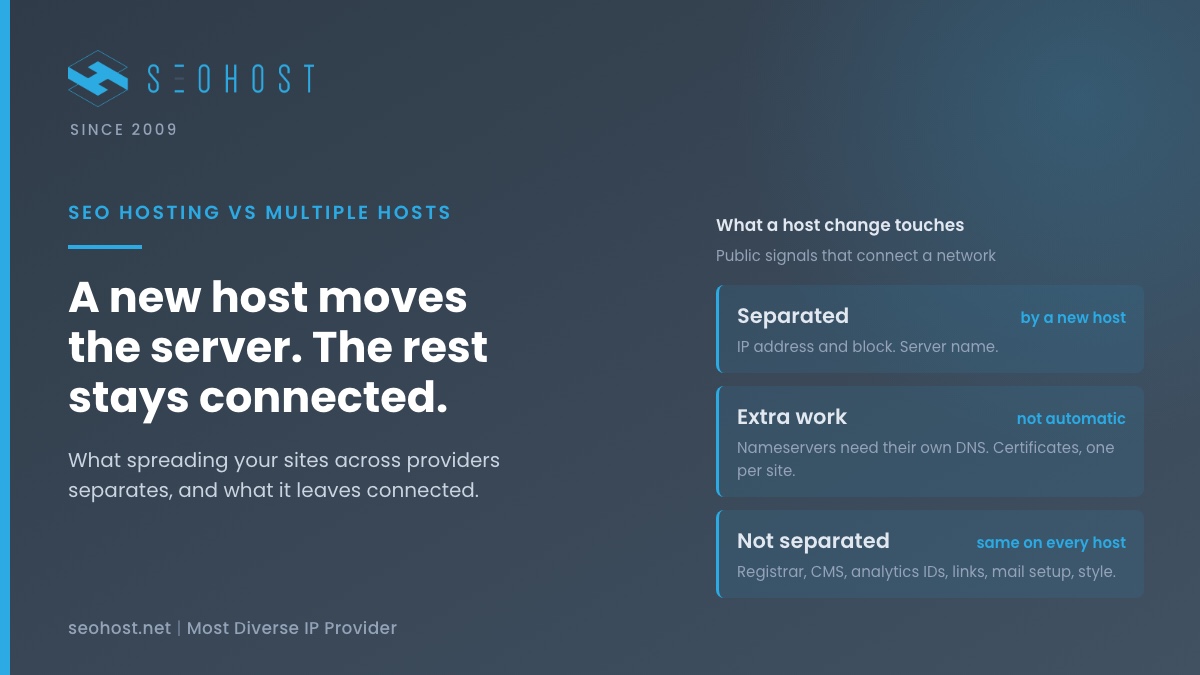
    Two signals separate automatically, two separate only with extra work, and six of the ten stay exactly where they were. They follow the domain, the code and the person, and all three come with you to every provider.

    Registration data is the clearest example. ICANN’s Registration Data Policy requires the registrar, the creation date, the expiry date and the domain status to be published for every domain, while the registrant’s name is redacted. Ten domains registered at one registrar on one afternoon read that way in ICANN’s own lookup tool, whatever servers they point at.

    Certificates are the other one people miss. Certificate Transparency logs are public, so every name on a certificate is listed for anyone to search. One certificate that covers several of your domains connects them permanently, on any host. Our note on why a CDN is not IP diversity walks through the same records from the proxy side.

    What a host change separates, and what it leaves connected Three columns. The first column, separated by a different host, lists the IP address and block and the server name. The second column, separated only with extra work, lists nameservers, which need a different DNS provider, and TLS certificates, which need one certificate per site. The third column, not separated, lists registrar and creation date, CMS theme and plugins, analytics tag and ad IDs, links between the sites, mail setup, and author names and style. A footer notes that these follow the domain, the code and the person, not the server. TEN SIGNALS, ONE HOST CHANGE A new host moves the server. The rest stays connected. SEPARATED by a different host IP address and block Server name ONLY WITH EXTRA WORK a host change alone is not enough Nameservers need a separate DNS provider TLS certificates need one certificate per site NOT SEPARATED the same on every host Registrar and creation date CMS, theme and plugins Analytics, tag and ad IDs Links between the sites Mail setup Author names and style These follow the domain, the code and the person. None of them lives on the server.

    The Real Cost of Multiple Hosts Is Not the Bill

    Price comparisons between the two approaches usually stop at the monthly invoice, and that is where they go wrong. The invoice is the part of the cost that stays flat per site. What grows with every provider you add is the number of separate things you have to keep working.

    To make that concrete we used a 14-site network, because 14 is the median number of IPs on an active SEOHost.net account: half our 88 active IP accounts hold that many or fewer (as of 28 August 2026). In other words, it is an ordinary network rather than a large one.

    What you have to keep workingFourteen sites on multiple hostsFourteen sites on one SEO host
    Control panels and loginsUp to 141
    Renewal dates and invoicesUp to 141
    Payment methods on fileUp to 141
    PHP upgrade schedules set by someone elseUp to 141
    Backup systems to test-restoreUp to 141
    Support desks to learnUp to 141
    Sites one outage or suspension can reach1All 14, unless you split the account
    Moving parts in a 14-site network, multiple hosts against one SEO host

    The last row is the honest one, and it cuts the other way. One account concentrates risk, which is the strongest argument multiple hosts has. We come back to how to answer it without thirteen extra logins.

    One Line Item Makes the Point: PHP Versions

    PHP shows how the admin compounds. According to the PHP project’s support schedule, each release branch gets two years of active support and two more of security fixes only, after which it reaches end of life. Security support for PHP 8.2 ends on 31 December 2026.

    Across multiple hosts, each provider retires old versions on its own timetable, announces it its own way, and lets you switch through its own panel. Fourteen sites means fourteen notices to catch and fourteen upgrades to test. Miss one and that site runs unpatched code. The same pattern repeats for backups, certificates and every other recurring job.

    Pricing Multiple Hosts Honestly: Run the Numbers Yourself

    We are not going to quote other providers’ prices. They change, they vary by promotion, and the only source for them is the providers themselves. What we can give you is the list of lines a fair comparison has to include, and a calculator to add them up.

    For each plan, use the renewal price, not the first-term price, because you pay the renewal every year after the first. Add any certificate, backup or dedicated address the plan charges extra for. Then put a figure on your own time, because the logins and upgrades above are paid for in hours. Our transparent pricing breakdown lays out the SEO hosting side of the comparison line by line.

    Count the Cost of Multiple Hosts

    Pick a network size, then enter your own figures. Nothing is pre-filled, and nothing leaves your browser.

    Enter your figures above.
    Get an SEOHost.net quote

    What One SEO Host Replaces, and What It Cannot Hide

    Of the ten signals on the map, a good SEO host can separate the first four from a single account: a different IP address per site, a server name that is not shared, a private ns1 and ns2 per domain, and a separate certificate per site. Multiple hosts gives you the first two, and the second two only if you do the extra work for each provider.

    The other six are not a hosting matter, and any host that claims to hide them is overselling. Your registrar record, your theme, your analytics ID, your links, your mail setup and your writing are yours to vary on any server. Vary them because it is good practice, not because a provider promised to.

    Answering the Concentration Risk Without Thirteen Extra Logins

    The best argument for multiple hosts is that one account is one point of failure. The answer is to split the network into two or three accounts or locations, not fourteen, which keeps most of the containment and very little of the admin.

    Some of our customers already work this way. As of 28 August 2026, 8 of 56 clients holding IP accounts with us run two or more separate accounts rather than one bigger estate. A split across continents goes further, since our USA and European addresses come from different pools. The median active account has also been with us for 4.9 years, which says something about how often people need to move once the setup is right.

    SEO Hosting vs Multiple Hosts: A Decision Rule by Network Size

    Here is the rule we would give a friend. It is a judgment from running hosting, not a measured threshold, so weigh it against your own hours from the calculator.

    Your networkWhat we would doWhy
    1 to 3 sites, no mail sent from themMultiple hosts, or one ordinary planAdmin is small, and nothing needs a dedicated address
    1 to 3 sites that send mailA dedicated address per site, on either approachA shared address shares its mail reputation
    4 to 10 sitesOne SEO host, optionally split into two accountsLogins and PHP upgrades start to slip
    More than 10 sitesOne SEO host split by location, or an SEO VPSThe admin grows with every provider; the separation does not
    SEO hosting vs multiple hosts by network size

    The mail row deserves its own link. Our guide to what a bad neighborhood IP actually costs explains why a shared address hurts mail long before it could touch rankings, and our comparison of SEO hosting and PBN hosting covers which product suits which kind of network.

    What SEOHost.net Plans Include for This

    This is what our USA Class C SEO hosting is built to do from one account: a dedicated Class C address per site from non-consecutive blocks, private ns1 and ns2 per domain, free SSL issued on each site, and the IP Manager tool inside WHM to assign and swap addresses. We check an address's reputation before issuing it, and if you find one listed, we swap it free.

    For the split described above, EU Class C plans run on the same terms from a separate pool, Class A IP hosting in the USA varies the first octet as well, and an SEO VPS suits the largest networks. Migration is free, and every plan carries a 30-day money-back guarantee.

    Frequently Asked Questions About SEO Hosting vs Multiple Hosts

    Is spreading your sites across multiple hosts still worth it for SEO in 2026?

    In practice, it is worth it for a small number of sites and rarely for the reason people expect. Google has said it treats each website on its own merits, so a different host does not lift rankings. What multiple hosts genuinely buys is separation from one provider's outage or suspension. Past a handful of sites, we think the admin it adds outweighs that separation.

    Does Google rank a site differently on shared hosting than on dedicated hosting?

    Typically not. In 2021 Google's John Mueller said that using shared hosting is perfectly fine and does not negatively affect a site in Google Search, and that Google treats each website based on its own merits, not its virtual neighbors. Speed and uptime still matter to visitors, but the type of hosting is not itself a ranking input.

    SEO hosting vs multiple hosts: which one is cheaper for a 14-site network?

    Specifically, it depends on the renewal price of every plan you would use, not the first-term price, so add up your own quotes rather than trusting a headline. Then add what the bill leaves out: fourteen logins, fourteen renewal dates and fourteen PHP schedules, priced at what your time is worth. The calculator in this post turns those into your own figure rather than ours.

    Which footprints still connect my sites when they sit on multiple hosts?

    Notably, most of the public ones. Registrar and creation date are published for every domain, the CMS, theme and analytics IDs sit in each page's source, and the links between the sites are visible to any crawler. A host change separates the IP address and the server name. Nameservers and certificates separate only if you change those as well.

    Separate nameservers vs separate hosts: which one does more to split a network?

    In fact, nameservers are often the bigger tell, because a network spread across ten hosts but managed through one DNS account shows the same nameserver pair on every domain. Separate hosts change the IP address; separate nameservers change a record anyone can read in seconds. A private ns1 and ns2 per domain does both jobs from a single account.

    How many sites can you run on multiple hosts before the admin outweighs the savings in 2026?

    Overall, our working rule is about three. Up to three sites, separate hosts are easy to keep current and the separation is real. From four to ten the logins, renewals and PHP upgrades start to slip, and above ten, keeping every site current becomes a job of its own. That is a judgment from running hosting rather than a measured threshold, so test it against your own hours.

    Does SEOHost.net give each site its own Class C IP and nameservers?

    In particular, every plan does this. Each site you assign an address to gets a dedicated Class C IP from non-consecutive blocks, its own private ns1 and ns2, and its own free SSL certificate. The IP Manager tool inside WHM assigns and swaps addresses per site, so the separation multiple hosts would give you is handled from one control panel.

    Can I split one network between two SEOHost.net accounts or locations?

    Indeed, and some customers already do. As of 28 August 2026, 8 of 56 clients holding IP accounts with us run two or more separate accounts rather than one larger one. Placing part of a network on USA addresses and part on European addresses also puts the halves in different pools on different continents, which keeps one account from carrying everything.

    Does SEOHost.net check an IP address's reputation before issuing it in 2026?

    Fortunately, yes. We check an address's reputation before it is assigned to a new account. If you still find an address you were issued on a blocklist, tell us and we will swap it free of charge. You can also run the five-minute blocklist check from our bad neighborhood guide on any address before you build on it.

    Will moving my sites from multiple hosts to one SEO host affect my rankings?

    Ultimately, not if the URLs stay the same. Google treats a change of hosting provider with unchanged URLs as an infrastructure move, and says a temporary drop in Googlebot's crawl rate right after the move is normal, followed by a steady increase over the next few days. Migration onto SEOHost.net is free, and moving one site at a time keeps any wobble small.

    October 6, 2026
  • Bad Neighborhood IPs: What Sharing an IP With Spam Sites Actually Costs You

    Bad Neighborhood IPs: What Sharing an IP With Spam Sites Actually Costs You

    • What a Bad Neighborhood IP Actually Means: Three Different Things
    • Does a Bad Neighborhood IP Hurt Your Google Rankings?
      • What Google's Spam Policies Actually Describe
      • The One Case Google Documents: When Spam Takes Over a Whole Host
      • The Patent Everyone Cites, Read Properly
    • Where an IP Address's History Really Does Cost You
    • Why Every IPv4 Address You Buy in 2026 Has a History
    • We Scanned Our Own Neighborhood: 512 Addresses, Two Blocklists
      • What the Scan Actually Shows
    • The Five-Minute Bad Neighborhood IP Check
    • What to Do If an IP Address You Were Issued Is Listed
    • Shared IP vs Dedicated Class C IP: What the Price Difference Buys
      • What SEOHost.net Plans Include for This
    • Build the Commands for Your Own Address
    • Frequently Asked Questions About Bad Neighborhood IPs
      • Is a bad neighborhood IP still important for SEO in 2026?
      • Can other websites on my shared IP address affect my Google rankings?
      • Bad neighborhood IP vs bad link neighborhood: which one does Google actually act on?
      • How do I check whether a bad neighborhood IP is on a blocklist in 2026?
      • Why does a Spamhaus lookup through a public resolver not give a real answer?
      • Shared IP vs dedicated IP: which one protects you from a bad neighborhood IP?
      • Can I move a site off a listed address with the SEOHost.net IP Manager?
      • Why is outbound SMTP closed on every SEOHost.net VPS?
      • Is a dedicated Class C IP from SEOHost.net worth paying for with one site in 2026?
      • How long does a bad neighborhood IP stay on a blocklist after the spam stops?
    TL;DR

    A bad neighborhood IP is mostly not a ranking problem: Google’s spam policies describe links and behavior, not addresses. What an address’s history really costs you is rejected mail, challenged traffic and a cleanup you run yourself. We scanned the 512 addresses around our own site against two blocklists to show what a real neighborhood looks like, and how to check yours in five minutes.

    Sooner or later somebody shopping for cheap hosting asks the same question: if I end up on a bad neighborhood IP, sharing an address or a block with spam sites, will Google punish my site for the company it keeps? It is one of the oldest questions in SEO hosting. A Webmasters Stack Exchange thread from 2010 asks it almost word for word, and the answers have been circling it ever since.

    Listen: why Google’s published policies say nothing about your IP’s neighbors, and where an address’s history really costs you. By Terry Cane, Chief Operating Officer, SEOHost.net.

    This post answers it from the documents rather than from folklore, and then from a measurement. We looked up every address in the two blocks our own website and mail use against two public blocklists, so you can see what a real neighborhood looks like rather than an imagined one. After that comes the five-minute check you can run on any address before you build on it, including any address we issue you. By Terry Cane, Chief Operating Officer, SEOHost.net.

    What a Bad Neighborhood IP Actually Means: Three Different Things

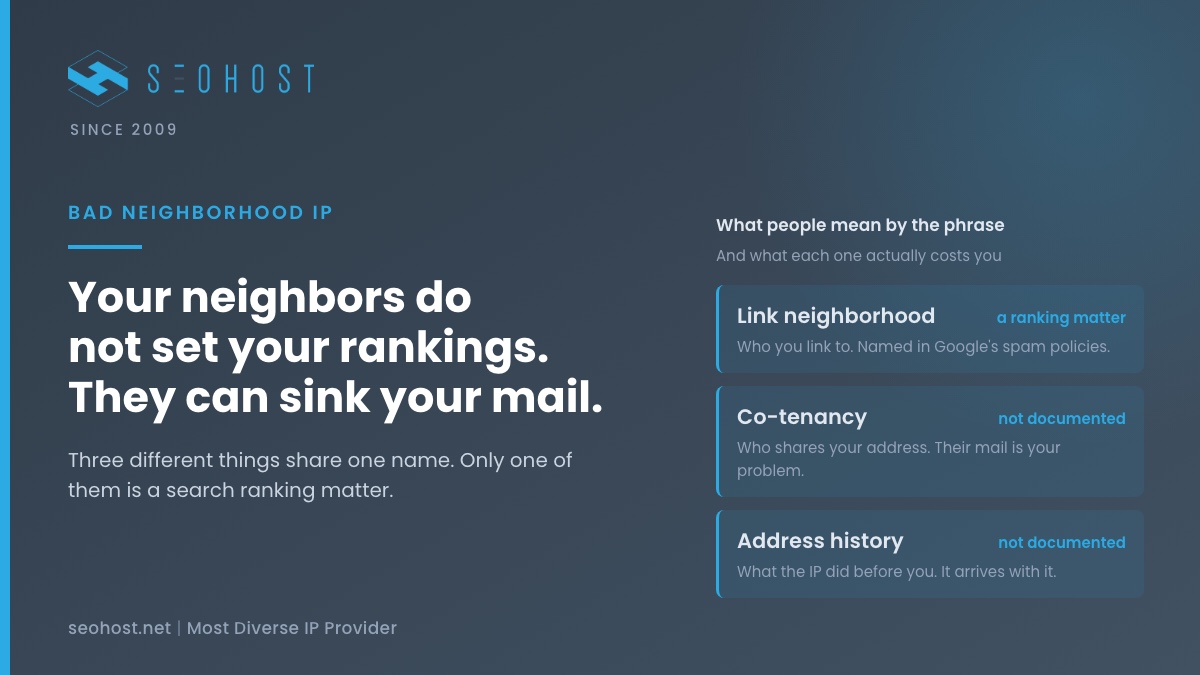
    The phrase does a lot of damage because it bundles three unrelated ideas under one name. Pull them apart and most of the fear goes with them, while the part worth worrying about gets much sharper.

    NeighborhoodWhat it refers toDoes it touch rankings?What it really costs
    The link neighborhoodThe sites you link to and that link to youYes, directly named in Google’s spam policiesA manual action or discounted links
    Co-tenancyOther sites on the same address or serverNot documented, outside an overrun hostTheir mail, their abuse complaints, their load
    Address historyWhat the address did before it reached youNot documented as a ranking inputBlocklist entries that arrive with the address
    The three things people mean by a bad neighborhood IP

    Only the first row is a search ranking matter, and it has nothing to do with hosting. The other two are real, but they cost you through mail servers, firewalls and support queues. That distinction decides what you should actually pay to avoid.

    Does a Bad Neighborhood IP Hurt Your Google Rankings?

    The short answer is that nothing Google publishes says so, and one thing it published says the opposite in all but an extreme case. Three documents carry the whole argument, and each one is worth reading for what it does and does not say.

    What Google’s Spam Policies Actually Describe

    Google’s spam policies for web search define link spam as “the practice of creating links to or from a site primarily for the purpose of manipulating search rankings.” Every other policy on that page, from cloaking to scaled content abuse, describes something a site does. None describes where it is hosted.

    One policy does reach into history, and it is the useful correction. Expired domain abuse covers buying an expired domain and repurposing it to manipulate rankings. So the history Google writes rules about belongs to the domain name, not to the address it resolves to. If you are buying anything secondhand for a network, the domain is the thing to research.

    The One Case Google Documents: When Spam Takes Over a Whole Host

    In 2012 the Search Central blog addressed this directly in a post for hosting services overrun by spam. Google says it makes “a strong effort to be granular and tackle only spammy pages or sites,” and that it removes an entire hosting service from results only when spammers have “pretty much taken over” it.

    That is the real boundary. A free host that has become a spam farm is a bad neighborhood in the full sense. A normal paid server with a few dubious co-tenants is not, and Google has never described it as one.

    The Patent Everyone Cites, Read Properly

    The other source in every forum thread is US patent application 20050071741, which says a list of “known-bad contact information, name servers, and/or IP addresses” may be used to predict a domain’s legitimacy. It was filed in 2003, its status is now expired, and a patent records what may be done rather than what is. Treat it as a reason for caution, not as evidence of a ranking factor.

    Where an IP Address’s History Really Does Cost You

    Set rankings aside and the bad neighborhood IP question becomes a practical one, because the systems that do read address reputation are everywhere else on the internet. Mail is the biggest of them by a distance.

    RFC 5782, the specification for DNS blocklists, describes how a list publishes an entry for each listed address and attaches a text reason that is “often used as the text of an SMTP error response.” In plain terms, a mail server looks up the sending address, finds it listed, and refuses the message with the list’s reason attached.

    The lists are blunt by design. SpamCop says of its own SpamCop Blocking List that it is “aggressive and often errs on the side of blocking mail.” That is a reasonable trade for a spam filter and an unpleasant one for a site whose contact form, password resets and order emails leave from a listed address.

    Here is why it matters more for a network than for one site. Every site that sends from the same address shares one reputation. A single compromised contact form on one of them puts all of them on the list at once, and the list neither knows nor cares that the other sites did nothing wrong.

    Why Every IPv4 Address You Buy in 2026 Has a History

    There is no fresh IPv4 supply left to issue, which is why addresses are priced the way they are. Our transparent pricing breakdown covers that scarcity in detail. The consequence for this question is simple: almost every address in service today has been used by somebody before you.

    So a bad neighborhood IP is not something a careful buyer can avoid by finding a host with new addresses. Nobody has new addresses. What actually differs between hosts is what happens next: whether you can see an address’s state, and whether you can move off one that turns out to carry somebody else’s problem.

    That also explains why the cheapest arrangement is the riskiest one for mail. On a shared address you inherit not only the history but every co-tenant’s behavior from today onward, in real time. On a dedicated address the history arrives once, and from then on it is yours.

    We Scanned Our Own Neighborhood: 512 Addresses, Two Blocklists

    Arguing about neighborhoods in the abstract gets nowhere, so we measured one. On 1 October 2026 we looked up every address in the two /24 blocks that the SEOHost.net website and its mail actually use, against SpamCop and Barracuda, two widely used lists that answer an ordinary lookup. Before trusting any result, we confirmed both lists answered their required test entry.

    What we checkedSpamCopBarracudaWhat it tells you
    Test entry 127.0.0.2AnsweredAnsweredBoth lists were live, so a blank is a real “not listed”
    All 512 addresses in both blocks0 listed2 listedReal neighborhoods contain listed neighbors
    Our own three mail-sending addressesNot listedNot listedA neighbor’s listing did not become ours
    SpamhausNot queriedNot queriedIt refuses public resolvers, so we did not count it
    The SEOHost.net Neighborhood Scan – 512 addresses, two lists, 1 October 2026

    What the Scan Actually Shows

    So 2 of 512 addresses next to ours are on a list today, and neither of them is ours. Both lists we queried answer per address, which is exactly what RFC 5782 describes, so a listed neighbor two numbers away changes nothing about the mail we send.

    We are not naming the two listed addresses. They belong to other people, and a one-day snapshot is not a verdict on anyone. Treat the figure the same way: it is one morning on two lists, published so you can see that a perfectly ordinary block has a listed neighbor or two, and that this is normal rather than alarming.

    The Five-Minute Bad Neighborhood IP Check

    Run this on any address before you put a site or a mail flow on it, including an address we issue you. It needs a terminal and nothing else. The widget further down builds the exact commands for an address you type in.

    1. Prove the list is answering. Look up the test entry first: dig +short 2.0.0.127.bl.spamcop.net. RFC 5782 requires every IPv4 list to carry 127.0.0.2, so no reply means the list is not answering you and every blank after it is meaningless.
    2. Reverse the address and ask. For 192.0.2.99, query 99.2.0.192.bl.spamcop.net, then the same name ending in b.barracudacentral.org. A reply in the 127.0.0.x range means listed.
    3. Read the reason. Repeat the listed lookup with TXT on the end. The reason names the list’s own delisting process.
    4. Handle Spamhaus separately. Its published return codes include 127.255.255.254 for a query that arrived through a public resolver. That is an error, not a listing, so use your own resolver or Spamhaus’s website lookup.
    5. Check who shares the address. Run dig +short -x on it. If the answer is a generic server name, ask the host whether the address is shared before you send mail from it.
    The five-minute bad neighborhood IP check Five steps run left to right. Step one queries the required test entry 127.0.0.2 to prove a blocklist is answering. Step two queries the address with its four numbers reversed. Step three reads the TXT reason for any listing. Step four treats Spamhaus replies in the 127.255.255.x range as errors rather than listings. Step five runs a reverse lookup to see whether the address is shared. A footer notes that a listing follows the address, not its neighbors. FIVE MINUTES, ONE TERMINAL Check the address, not the rumor about it. 1 Test entry Ask for 127.0.0.2. No reply means the list is not answering. 2 Reverse and ask 99.2.0.192 plus the list zone. 127.0.0.x = listed. 3 Read the reason The TXT record names the list’s delisting process. 4 Spamhaus apart 127.255.255.x is an error code, never a listing. 5 Who shares it Reverse lookup. A generic name means ask before mailing. A listing follows the address. It does not follow the neighbors next to it.

    What to Do If an IP Address You Were Issued Is Listed

    Finding a listing is not an emergency, and the right response depends on which list it is and whether the history is yours. Start from the reason text, then pick the row that matches.

    What you foundWhat it usually meansWhat to do
    Listed on SpamCop, nothing sends from it nowOld reports that have not aged out yetWait: the list is time-based and delists automatically once reports stop
    Listed on BarracudaAn automated reputation scoreRequest removal with a valid explanation; processing is typically within 12 hours
    Listed, and your own site is sendingThe history is yours, not inheritedFind the sender first: a contact form or a compromised script. Delisting before that fails
    Listed, and you would rather not waitSomebody else’s history on your addressMove the site to another address and leave the listing behind
    A Spamhaus reply of 127.255.255.xYour resolver was refusedNothing is listed. Re-run from your own resolver
    Bad neighborhood IP listings and the response that fits each one

    The fourth row is the one hosting decides. Moving a site is only easy if the host gives you more than one address and a way to reassign them without a ticket, which is the practical difference between an address you can manage and one you are stuck with.

    Shared IP vs Dedicated Class C IP: What the Price Difference Buys

    Here is the honest version, from a company that sells the dedicated column. If you run one site and send no mail from its server, a shared address costs you almost nothing and you should keep the money. A bad neighborhood IP has nothing to reach.

    The arithmetic changes when you run several sites, send mail from them, or could not stand one listing reaching all of them at once. Then three things are worth paying for: an address that only your site uses, addresses in different blocks so one problem stays one site’s problem, and the ability to move a site in minutes. Our honest reassessment of Class C IPs covers the ranking side of that argument, and it is the weaker side.

    What SEOHost.net Plans Include for This

    That is what our USA Class C SEO hosting is built around: a dedicated address for every site you assign one to, private ns1 and ns2 per domain, and an IP Manager tool inside WHM that assigns and swaps IPs per site, so leaving an address you would rather not use takes a couple of minutes. European networks get the same terms on EU Class C plans, and estates that want separation at the very top of the address use Class A IP hosting in the USA. Run the check above on any address we issue you. Every plan carries a 30-day money-back guarantee.

    One more line, because it is the same argument from the other side. Outbound SMTP is closed on every SEO VPS in our network, deliberately, to protect the reputation of the ranges every customer’s addresses come from. Our comparison of VPS and shared SEO hosting explains what to use for mail instead, and our note on why a CDN is not IP diversity covers the records that connect your sites even behind a proxy.

    Build the Commands for Your Own Address

    Type an IPv4 address and choose a list. The tool writes the test query and the lookup for you, ready to paste into a terminal. Nothing leaves your browser.

    Build Your Neighborhood Check

    Enter the address, pick a list, and copy the two commands. Run the test query first.

    Enter an IPv4 address above.
    See SEOHost.net plans

    Frequently Asked Questions About Bad Neighborhood IPs

    Is a bad neighborhood IP still important for SEO in 2026?

    In practice, it matters far less for rankings than the phrase suggests and far more for everything else. Google's published spam policies describe behavior such as link spam and cloaking, and none of them names an address. Where a bad neighborhood IP genuinely costs you is mail that gets rejected, traffic that gets challenged and a recovery you have to run yourself.

    Can other websites on my shared IP address affect my Google rankings?

    Typically not, and the one documented exception is extreme. In 2012 Google said it tries to be granular and act only on spammy pages or sites, and that it removes an entire hosting service only when spammers have pretty much taken it over. A few dubious neighbors on a normal shared server is not that situation, and Google has never described it as one.

    Bad neighborhood IP vs bad link neighborhood: which one does Google actually act on?

    By contrast with an address, a link is something Google's policies name directly. Link spam is defined as creating links to or from a site primarily to manipulate rankings, so the neighborhood that counts is the one you link into. A bad neighborhood IP is about who shares your server or your block, which is an operations question rather than a ranking one.

    How do I check whether a bad neighborhood IP is on a blocklist in 2026?

    Specifically, reverse the four numbers of the address, append the list's zone and look up the result. A reply in the 127.0.0.x range means listed; no reply means not listed. Query 127.0.0.2 first, because RFC 5782 requires every IPv4 list to carry it, so a working list must answer. The check takes about five minutes per address.

    Why does a Spamhaus lookup through a public resolver not give a real answer?

    Notably, Spamhaus refuses to answer queries that arrive through public or open resolvers, and it replies with an error code instead. That code still begins with 127, the range lists use to signal a listing, so a careless script reads it as one. Run the query from your own resolver, or use the lookup on its website, and treat any reply in the 127.255.255.x range as an error rather than a verdict.

    Shared IP vs dedicated IP: which one protects you from a bad neighborhood IP?

    In fact, a dedicated address protects you from the part that hurts, which is somebody else's mail. On a shared IP your reputation moves in real time with every co-tenant who sends. On a dedicated IP the history arrives once, at issue, and after that it is yours to keep clean. Neither one changes how Google ranks the pages on it.

    Can I move a site off a listed address with the SEOHost.net IP Manager?

    Fortunately, yes, within the addresses on your own plan. The IP Manager tool inside WHM assigns and swaps IPs per site, so moving one site from an address you would rather not use to another of yours takes a couple of minutes rather than a support ticket. The listing stays with the address you left, and the site carries on from a clean one.

    Why is outbound SMTP closed on every SEOHost.net VPS?

    Ultimately, it protects the reputation of the address ranges every customer's IPs come from. A VPS with an open mail port lets one compromised instance send spam from our address space, and some lists act on whole network ranges rather than single addresses, so the damage can reach addresses that belong to other people. Send mail through a dedicated email provider's API instead, which keeps your web addresses out of the mail path entirely.

    Is a dedicated Class C IP from SEOHost.net worth paying for with one site in 2026?

    That said, usually not, and we would rather say so than sell past it. One site that sends no mail from its server gains very little from its own address, because there is nothing for a neighbor's reputation to reach. The case changes when you run several sites, send mail from them, or cannot afford one listing to reach all of them at once.

    How long does a bad neighborhood IP stay on a blocklist after the spam stops?

    Overall, it depends on the list, and the honest answer is that some lists forget quickly while others wait for a request. SpamCop describes its list as time-based, with quick and automatic delisting once reports stop. Barracuda says removal requests are typically investigated and processed within 12 hours when they carry a valid explanation. Read the TXT reason first, because it names the list's own process.

    October 2, 2026
  • The Role of Content Marketing in Local SEO

    The Role of Content Marketing in Local SEO

    As the old cliche goes, content is king. Careful, targeted content marketing is one of the pillars of success with every form of search engine optimization, including local. Leveraged in tandem with other local tools like Google My Business and Facebook, it can easily help you take your business to entirely new heights.

    Generally speaking, where local content marketing is concerned, you have two options. On the one hand, you can simply write on topics you know your target audience is interested in, and add a few personal touches to them. Mention a local landmark, reference a recent event, talk about your own experiences in a city, or provide advice specifically geared towards people in your area.

    For instance, let’s say you own a hardware supply shop and you’re writing a guide on tiling for a backyard patio. You might add a few recommendations based on your city’s weather and climate, recommend a local contractor, or suggest a local material wholesaler. The key here is to take a light touch.

    As with keywords, you don’t want to bog down your content with too many local references. Not only can this make your copy cumbersome and difficult to read, in extreme cases it could potentially lead to you being penalized by Google’s algorithms. Just write as you ordinarily would, and sprinkle in a few references. 

    Your other option is to write content geared from the foundation for a local audience. This might include information on nearby activities and events, case studies or profiles of customers and business partners, or announcements about your business and its local activities. If you’re feeling stuck on content, you can use a tool like Google Trends to see what search terms are popular in your area and generate ideas from that. 

    In both cases, the same rules apply to local-oriented content as to any other content:

    • Write well. Proper spelling and grammar are a must. We’d also advise steering away from any unnecessarily complex words. 
    • Make it easy to digest. Use a tool like Hemingway, and ensure anything you write is at a reading level of eighth grade or lower. Break up long walls of text with images or subheads. Keep things as concise as possible. 
    • Keep it relevant. Focus on what your audience wants. You’re trying to drive traffic and sales, sure. But you do so by serving their needs, not pushing your own. 
    • Do your research. Beyond keywords, you should also know what type of content is most frequently associated with your brand, including niche topics. 

    Where local search is concerned, content marketing is part of a unified whole. Social media, business listings, on-page SEO, and customer reviews work together with created content to act as the foundation of an effective marketing campaign. If you’re to truly master local search, you’ll need to master each one in turn.

    April 9, 2020
  • Website Not Ranking? The Problem Might Not Be Your SEO

    Website Not Ranking? The Problem Might Not Be Your SEO

    Search engine optimization (SEO) is not foolproof. There are no guarantees. Rather, it’s about continually improving your site, continually working to grow your site and climb the search engine results page. 

    Sometimes it’s possible to do everything right and not see any improvement in your ranking. In situations like this, there are a few possibilities. First, you may not be targeting the right keywords or generating the correct topics for your audience.

    In this scenario, it doesn’t matter if you’re producing compelling, high-quality content. It’s not targeted at your primary demographic, which means you’re pulling in traffic from users who aren’t particularly interested in your brand. The good news is that this is a relatively easy fix.

    All it requires is that you do a bit of market research. 

    First, take a look at your competition. Use a tool like Moz or Google’s Keyword Planner to see what keywords they’re targeting and give you an idea of where your own focus should be.   You should also draw on data you’ve collected from your own users, through their interactions with your site, your social feeds and any surveys you’ve sent out. 

    It may also be that you are spinning content, or writing content that Google has identified as low-quality. Again, this is a fairly easy fix. Either shore up your own content marketing efforts or bring in a contractor who can handle that for you. 

    The third alternative is that you have a branding problem. This one’s a bit more complicated. It requires that you first understand what’s wrong. 

    Ask yourself the following questions: 

    • Are my competitors doing anything particularly unique or noteworthy that I’ve failed to address? 
    • Has my brand been involved in any recent scandals, such as a faulty product or a viral post gone wrong? 
    • Are consumers speaking negatively about my brand, or worse, not talking about us at all? 

    Each of the above issues requires a slightly different approach. If you’ve been involved in a scandal, start making amends. Reach out to your audience, explain that you understand what you did wrong, and detail what you’re going to do to fix it. 

    If your brand has grown outdated or is being outperformed by competitors, you’ll need to figure out what they’re doing that you’re not. Why have you fallen so far behind? What can you do about it? 

    SEO doesn’t guarantee results. It never has. And it also cannot fix problems such as thin content, poor targeting, or a broken brand. These are all issues that must be addressed separately. 

    March 3, 2020
  • 3 Excellent Free Resources for Topic and Keyword Research

    3 Excellent Free Resources for Topic and Keyword Research

    Keyword and topic research can be tedious and tiresome even at the best of times. However, it’s also a necessary step in the creation of high-quality, compelling content. While you’re likely to be well-served through an all-in-one platform like Moz,  don’t underestimate the power of the myriad free tools available online.

    Here are a few we’d highly recommend if you’re suffering from a spot of writer’s block.  

    Keyword Sheeter

    Although it’s not quite as full-featured as Google’s Keyword Planner (which is also free), Keyword Sheeter mines Google autocomplete data to generate a huge list of possible search terms and phrases. It also includes filters to help you either eliminate irrelevant entries or narrow your search to entries containing certain words or phrases.

    It can take a bit of time to generate a list for niche topics, but it’s nevertheless an excellent starting point. Note that the free version of the tool doesn’t show search volume or any other data about the entries. You’ll need to use a secondary tool in order to glean that information. 

    Alternatively, you can purchase more comprehensive results through the platform, wither with premium currency or for a nominal fee. 

    The Content Strategy Helper

    It might not look like much at first glance, but the Content Strategy Helper is downright incredible. Developed by marketing strategist Daniel Butler, it searches across the web for content related to your keywords. The network of sites it pulls from is frankly almost overwhelming and includes Google, YouTube, Reddit, Hacker News, and How Stuff Works.

    And that’s just the ideas tab. Source & Place leverages Twitter search tool Followerwonk to track down influencers and thought leaders related to your topic. Whether you’re looking to connect with people for their social influence or trying to track down guest post opportunities, it’s an invaluable addition to your repertoire.

    Finally, if you’re interested in newsjacking, you can check out the Trending tab, which displays popular articles and news pieces. 

    WikiBrowser

    Created by the SEO toolkit developer topicseed, WikiBrowser is a bit more sophisticated than the other software on our list. When you enter a keyword, it provides a visualization of the topic’s outline on Wikipedia, while also generating a list of related topics and concepts that you can use to help spark your creativity. You can click on any of the generated topics to see topics related to them, and so on. 

    What’s in Your Toolkit? 

    The tools outlined above only represent a tiny cross-section of what’s available online. We chose three that we felt really stood apart from the rest, both in terms of what they did and how they functioned. We’re certain you’ll find them as useful in your own research as we did in ours.

    February 28, 2020
  • The Role of Intent in SEO

    The Role of Intent in SEO

    Let’s say you’re searching for information on how to set up a branded Facebook page. You type your query into Google and click on one of the results. It takes you to a website that immediately attempts to sell you social marketing services but gives you absolutely no information about how to do things yourself.

    (more…)
    January 18, 2019
  • Getting Started With Search Engine Optimization? Here’s Three Things To Do First

    Getting Started With Search Engine Optimization? Here’s Three Things To Do First

    Looking to get started as a webmaster? That’s awesome – but before you get too gung-ho, there are a few steps you should take to prepare, particularly where search engine optimization is concerned. See, the search will likely be the primary means by which new customers discover your business.

    (more…)
    January 16, 2019
  • What Is Quora’s Role In Search Engine Optimization? It’s Bigger Than You’d Expect

    What Is Quora’s Role In Search Engine Optimization? It’s Bigger Than You’d Expect

    Everyone eventually has a question they’re looking to have answered – and there’s no shortage of experts, informed and otherwise, on the Internet. Quora is a social network dedicated entirely to that dynamic. It’s a marvelously simple idea.

    (more…)
    January 15, 2019
  • What Exactly IS SEO Hosting, Anyway?

    What Exactly IS SEO Hosting, Anyway?

    Content might be king, but search engine optimization is still incredibly important in this day and age. Ensuring search engines such as Google can find and crawl your website – and that they’re able to easily categorize what your site contains -remains essential if you’re going to maximize your chances on the highly-competitive modern web. It’s not surprising, then, that many hosts offer what’s known as SEO Hosting.

    (more…)
    January 11, 2019

Specialized SEO hosting on diverse dedicated IPs across the USA and Europe, since 2009.

SEO Hosting USA

  • C Class SEO Hosting
  • B Class SEO Hosting
  • A Class SEO Hosting
  • SEO VPS
  • Bare Metal Dedicated Server

SEO Hosting Europe

  • C Class SEO Hosting
  • B Class SEO Hosting
  • A Class SEO Hosting
  • SEO VPS
  • Bare Metal Dedicated Server

Products

  • WordPress Hosting
  • Domain
  • Domain Transfer
  • SSL Certificates
  • FAQ
  • Support
  • Portal Login

Company

  • Why Us
  • Blog
  • Affiliate
  • Contact
  • Site map
© 2026 Seo Hosting LTD · 19 St. Mark Street, Valletta VLT 1362, Malta · +356 20 341591
VISAMASTERCARDPAYPAL
Terms of ServicePrivacy PolicySitemapCookie settings