- SEO Hosting Multiple IPs: How Many Should You Actually Buy?
- What SEO Hosting Multiple IPs Means on One Account
- Count Isolation Groups, Not Domains, for SEO Hosting Multiple IPs
- Where More IPs Stop Helping SEO Hosting Multiple IPs Buyers
- How Many IPs SEO Hosting Multiple IPs Customers Actually Hold
- What the Price Bands Do to Your SEO Hosting Multiple IPs Order
- The Band-Edge Price Table for SEO Hosting Multiple IPs
- Price Your Own SEO Hosting Multiple IPs Order
- Ordering Too Few or Too Many SEO Hosting Multiple IPs: What You Can Fix
- Assign Each Site on Purpose and Verify Your SEO Hosting Multiple IPs
- A Checklist Before You Buy SEO Hosting Multiple IPs
- Frequently Asked Questions: SEO Hosting Multiple IPs
- Can one SEO hosting multiple IPs account give every site its own IP address in 2026?
- How many IPs should a first SEO hosting multiple IPs order include for 12 live sites?
- SEO hosting multiple IPs vs one VPS with extra IPs: which suits a small network better?
- What does SEO hosting multiple IPs cost at 14 IPs on SEOHost.net in 2026?
- Is it cheaper to order 400 IPs than 380 IPs on the SEOHost.net USA Class C bands?
- One IP per site vs one IP per group: which does SEO hosting multiple IPs need in 2026?
- What happens to billing if I release unused IPs from an SEO hosting multiple IPs plan?
- Can I add IPs to a running SEO hosting multiple IPs account without taking sites offline?
- Does Google rank sites differently when SEO hosting multiple IPs separates their addresses in 2026?
- Where do I assign each site to its own IP on SEOHost.net after the order activates?
SEO hosting multiple IPs is sized by isolation groups, not domains: buy one IP for each set of sites that would be a problem if someone noticed they share an address. The USA price bands then decide whether adding a few more IPs is nearly free or a real jump.
SEO Hosting Multiple IPs: How Many Should You Actually Buy?
SEO hosting multiple IPs means one account that holds several dedicated addresses, so each site can sit on its own IP. The number to buy is the number of isolation groups in your estate, and that is almost always smaller than the number of domains. A group is a set of sites that would cost you nothing if someone noticed they share an address.
That rule produces a small order for most buyers. Our billing records show the median SEOHost.net IP account holds 14 IPs, and the price per IP depends on which volume band the order lands in. This guide shows how to count groups, what the bands do to the total, and which ordering mistakes you can still fix afterward.
Prices below are the USA Class C bands as the live plan page listed them on November 11, 2026. Check the page before you pay, because prices change.
What SEO Hosting Multiple IPs Means on One Account
On ordinary shared hosting, every site on a server answers on the same address, and the web server tells the sites apart by the hostname in each request. The Apache documentation calls this name-based virtual hosting and says many hosts can share one IP address. It also describes the alternative, IP-based hosting, where the site is chosen by the address the connection arrived on. nginx makes the same two-step choice: it matches the address and port first, then the Host header.
SEO hosting multiple IPs uses the second pattern on purpose. Your account holds a list of dedicated addresses, and each site is bound to one of them. The binding is one to one, so lengthening the list never disturbs a binding that already exists. New addresses appear in the panel waiting for assignment.
Assignment happens in the IP Manager tool that ships with the account. On a plain cPanel server the root-level equivalent is WHM’s Change Site’s IP Address, and cPanel’s documentation says the address must already exist on the server before you can pick it. Either way, the choice of which site gets which address is yours, and that choice is the real work.
Count Isolation Groups, Not Domains, for SEO Hosting Multiple IPs
Start with a sheet that lists every domain you control, then keep only the sites that are live now or have content ready and a launch date inside roughly sixty days. Parked domains and “maybe next quarter” ideas are wishes, not capacity. Then sort the counted sites with this table, which follows our sizing guide.
| Situation | Own IP? | Reasoning |
|---|---|---|
| Sites owned by different paying clients | Yes, one per client | One client’s estate should not be visible through another client’s server record |
| Sites meant to read as unrelated businesses | Yes, one each | A shared address is the cheapest way for anyone to connect them |
| A site carrying paid placements aimed at your money site | Yes | Keeps that commercial relationship from being easy to infer |
| Agency site plus its blog and docs subdomain | No | Already openly one operation |
| Niche sites under one visible brand, cross-linked on purpose | No | The connection is public by design, so hiding it buys nothing |
| Staging, demo and internal tools | No | Not indexed and not part of the public footprint |
Here is a worked count. Suppose the sheet lists 21 domains and nine are parked, so 12 count. Three client sites for three businesses make 3 groups, an agency site with its blog and docs makes 1, six niche sites under one visible brand make 1, and two review sites meant to read as independent make 2. That is 7 groups, so the order is seven IPs, not 21 and not 12.
Where More IPs Stop Helping SEO Hosting Multiple IPs Buyers
A separate address is a footprint control and a blast-radius limit. It is not a ranking input. Google’s John Mueller wrote on X in April 2024 that there are a limited number of IP addresses and it is normal for them to be shared, so no count of IPs lifts a page on its own.
What an extra IP does buy is containment. If a neighbor on a shared address gets listed on a blocklist, a dedicated address keeps that listing off your site, a risk we measured in our own neighborhood scan. It also keeps unrelated properties from being linked through a server record, which is the narrower claim behind the Class C question.
So the test for any extra IP is simple: name the observer it defeats. If the answer is “Google will rank this higher,” skip it. If the answer is “a client or a competitor could connect these two sites,” buy it. For the cost of the alternative, spreading sites over several hosts, see what multiple hosts really cost.
How Many IPs SEO Hosting Multiple IPs Customers Actually Hold
We read our billing records for the real distribution. As of August 28, 2026, SEOHost.net had 88 active IP accounts held by 56 clients, with 2,915 IPs under management. The median account holds 14 IPs, so half of all accounts hold 14 IPs or fewer, and the largest holds 253.
Averages mislead here: 2,915 IPs across 88 accounts is about 33 each, because a few large accounts pull it up. The median is the better guide to a first order. It tells you that the interesting price questions sit at small counts, and that a 400-IP order is rare.
Two limits apply to these figures. Billing records show how many IPs an account holds, not how its sites map onto them. And the snapshot is from late August, so treat it as a pattern and not a live count.
What the Price Bands Do to Your SEO Hosting Multiple IPs Order
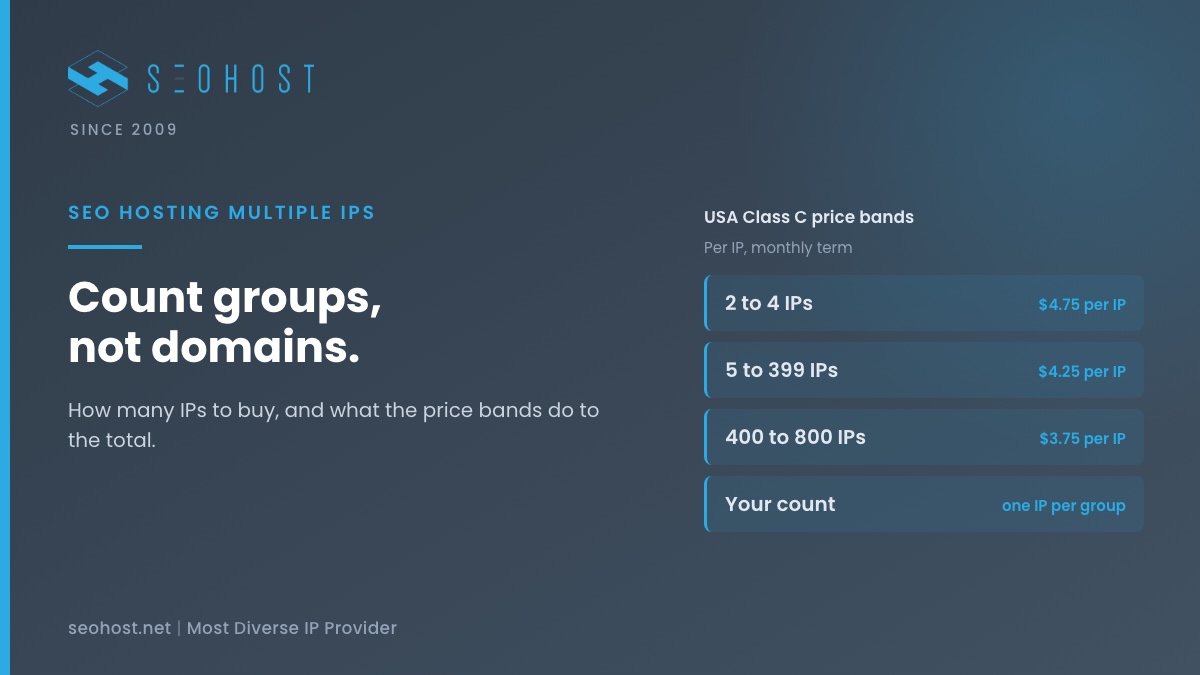
The USA Class C page lists three volume bands on the monthly term: $4.75 per IP for 2 to 4 IPs, $4.25 for 5 to 399, and $3.75 for 400 to 800. The page says the band your order lands in sets the price for every address in it, so crossing a threshold makes the whole order cheaper, not only the addresses above the line.
That produces three effects worth knowing before you pick a count. The fifth IP costs $2.25 more than four ($21.25 against $19.00), because the first four are priced in the dearer band. Splitting one purchase into two smaller orders can cost more, since each order is assessed on its own count: two orders of 4 IPs come to $38.00, while one order of 8 comes to $34.00.
The third effect sits near the top of the range. At 353 IPs the total is already $1,500.25, which is more than the $1,500.00 that 400 IPs cost. From 353 up to 399, ordering 400 costs less than ordering exactly what you need.
The plan page lists term discounts of 10, 20 and 30 percent for annual, two-year and three-year terms. Because they are percentages applied on top of the band rate, the break-even count does not move with the term, although the dollar totals do. Europe uses different bands, so read the European plan page separately before you apply these numbers there.
The Band-Edge Price Table for SEO Hosting Multiple IPs
This table is our arithmetic on the live bands, monthly term, USA Class C. Totals are the band rate times the IP count.
| IPs ordered | Rate per IP | Monthly total | What to notice |
|---|---|---|---|
| 2 | $4.75 | $9.50 | The smallest order |
| 4 | $4.75 | $19.00 | Top of the first band |
| 5 | $4.25 | $21.25 | The fifth IP adds $2.25 |
| 14 | $4.25 | $59.50 | Our median account size |
| 50 | $4.25 | $212.50 | Mid-size network |
| 253 | $4.25 | $1,075.25 | Our largest account size |
| 352 | $4.25 | $1,496.00 | Last count cheaper than 400 |
| 353 | $4.25 | $1,500.25 | First count dearer than 400 |
| 399 | $4.25 | $1,695.75 | $195.75 more than 400 IPs |
| 400 | $3.75 | $1,500.00 | The whole order reprices |
Price Your Own SEO Hosting Multiple IPs Order
Use the calculator to test your group count against the bands. Try your number, then try 400 to see whether a bigger order is cheaper.
Price Your IP Count on the USA Class C Bands
Enter how many IPs you plan to order. The math runs in your browser and nothing is sent anywhere. Rates are the plan page bands read on November 11, 2026.
Enter a count to see the monthly total.
See the live USA plansOrdering Too Few or Too Many SEO Hosting Multiple IPs: What You Can Fix
A wrong count is a billing adjustment, not a rebuild. Our guide on ordering the wrong number of IPs and the page on adding IPs to a running account set out the rules. In short:
| Mistake | What happens | What to watch |
|---|---|---|
| Too few IPs | Addresses are added to the allocation and running sites carry on untouched | Say what the addresses are for, so they come from outside ranges you already use |
| Too many IPs | Unused IPs can be released and stop billing from the next cycle | A released address returns to the pool and may go to someone else |
| Wrong spread | Usually a reassignment, not a new order | Decide the risk you are managing first |
| Moving a live site | A change on the account plus a DNS update; the site itself is untouched | The delay is DNS propagation, so lower the TTL ahead of time |
Google’s site move guide suggests lowering the TTL to a few hours at least a week before a move, and the same habit shortens a reassignment. If your limit turns out to be load and not addresses, compare an SEO VPS against staying on shared hosting.
Assign Each Site on Purpose and Verify Your SEO Hosting Multiple IPs
Decide the map on paper before the order goes in, as our mapping guide explains. Write one row per hostname, including the www form, with the IP it gets and the reason. An address already serving a live site is harder to move than a row in a sheet.
On setup day the panel offers free addresses in its own order, so sites get typed in whatever order they come to mind. The result is a layout nobody chose, such as your busiest site beside the one you would happily delete. Bring the sheet and assign each hostname against it.
Then verify every hostname instead of trusting the panel summary. The default query type in dig is A, so this prints the address a hostname answers on:
dig +short www.example.com
Compare each result with the sheet. A mismatch means a DNS record or an assignment is wrong, and it is far cheaper to find it on day one than after the site has built up traffic.
A Checklist Before You Buy SEO Hosting Multiple IPs
- List every domain, then keep only sites that are live or launching within about sixty days.
- Sort the kept sites into isolation groups and buy one IP per group, with no spare “just in case.”
- Run your count through the bands, then run 400 as well if you are above about 350.
- Order once, not in several small pieces, because each order is priced on its own count.
- Write the hostname-to-IP map first, with a reason beside each row.
- After activation, assign against the sheet and verify each hostname with a lookup.
If your count comes out smaller than you expected, that is the point, and the order form asks for the same number. For separation beyond the Class C level, compare wider range separation once you know which sites actually need it.
Frequently Asked Questions: SEO Hosting Multiple IPs
Can one SEO hosting multiple IPs account give every site its own IP address in 2026?
Specifically, one account holds a list of dedicated IPs and each site is bound to one of them, one to one. Adding addresses does not disturb bindings that already exist, so every site can have its own IP, or compatible sites can share one.
How many IPs should a first SEO hosting multiple IPs order include for 12 live sites?
In practice, order one IP per isolation group, not one per site. In our sizing example 12 live sites form 7 groups, so the order is seven IPs, plus any signed launches due inside about two months.
SEO hosting multiple IPs vs one VPS with extra IPs: which suits a small network better?
By contrast, shared SEO hosting suits most small networks, because the address count is the limit and not the machine. A VPS adds a fixed monthly fee on top of the same per-IP rates, so it pays off only when load or root access forces the move.
What does SEO hosting multiple IPs cost at 14 IPs on SEOHost.net in 2026?
Specifically, 14 IPs land in the 5 to 399 band at $4.25 per IP, which is $59.50 a month on the monthly term. The plan page lists 10, 20 and 30 percent off for annual, two-year and three-year terms, as read on November 11, 2026.
Is it cheaper to order 400 IPs than 380 IPs on the SEOHost.net USA Class C bands?
Indeed it is, because the band rate applies to every IP in the order. 380 IPs at $4.25 cost $1,615.00 a month on the monthly term, while 400 IPs at $3.75 cost $1,500.00.
One IP per site vs one IP per group: which does SEO hosting multiple IPs need in 2026?
That said, one IP per group is enough, because a shared address between openly connected sites hides nothing. Give a site its own IP only where its link to the other sites would be a problem if someone noticed.
What happens to billing if I release unused IPs from an SEO hosting multiple IPs plan?
Specifically, released IPs stop being billed from the next cycle, and any IP still assigned to an account has to be unassigned first. A released address returns to the pool and may be issued to someone else, so release only IPs you will never want back.
Can I add IPs to a running SEO hosting multiple IPs account without taking sites offline?
In practice, yes. New addresses appear in the panel awaiting assignment, and running sites keep the addresses they already have. Moving an existing site onto a new address is a DNS change, so lower the record lifetime beforehand.
Does Google rank sites differently when SEO hosting multiple IPs separates their addresses in 2026?
Overall, Google has not described the address as a ranking input. John Mueller wrote on X in April 2024 that it is normal for IP addresses to be shared. Separate IPs limit footprint and neighbor risk, and they do not lift rankings.
Where do I assign each site to its own IP on SEOHost.net after the order activates?
Specifically, assignment happens in the IP Manager tool that ships with every account, beside cPanel and WHM. Bring your hostname sheet, assign each hostname against it, and verify each one with a DNS lookup afterward.